WPNeon checks WordPress plugins, themes and hosting against the directory and the vendor, with the date on every figure.
Six essentials · What to skip · Plugins to remove · Pick a theme · Where to buy · Hosting · How we decide · All comparisons · FAQ
A new WordPress site needs six plugins, not thirty. The must-have WordPress plugins are a firewall, a backup, a cache that matches your host, one SEO plugin, one form, and something that stops spam. For most sites that is Wordfence, UpdraftPlus, LiteSpeed Cache, Rank Math, WPForms Lite and Akismet, and everything after that is a decision about your site, not about WordPress. The picks below were chosen on the plugin directory’s own numbers, read on 5 September 2026, and every figure on this page carries the date it was checked.
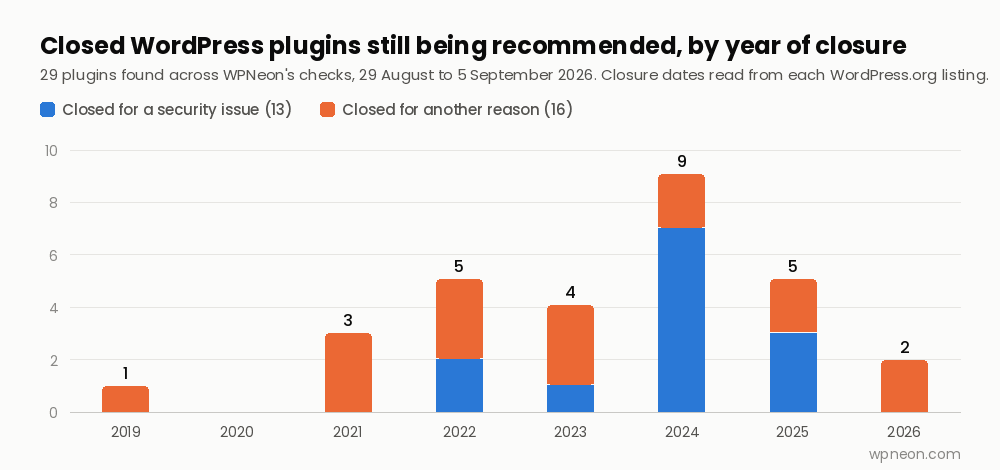
The reason a page like this needs to exist: the directory holds more than 71,000 free plugins, and across the pages WPNeon re-checked this month, 29 plugins that other guides still recommend turned out to have been closed by WordPress.org, 13 of them for security reasons. They are listed further down, with dates, so you can check your own site against them.
Which plugins does every WordPress site actually need?
Six jobs, one plugin each. The table shows the directory’s figures for the pick in each job; the notes under it say why that one and what the honest alternative is.
| Job | Pick | Active installs | Rating (reviews) | Last release | Free tier covers |
|---|---|---|---|---|---|
| Firewall and malware scan | Wordfence 9.0.0 | 5,000,000+ | 4.7 (4,992) | August 2026 | Firewall, scanner, login limits; firewall rules arrive 30 days late on free |
| Backups | UpdraftPlus 1.26.7 | 3,000,000+ | 4.8 (8,637) | August 2026 | Scheduled backups to Drive, Dropbox, S3; restore from the dashboard |
| Caching | LiteSpeed Cache 7.9.1 | 7,000,000+ | 4.8 (2,769) | September 2026 | Everything; page cache only on a LiteSpeed server or QUIC.cloud |
| SEO | Rank Math 1.0.277.2 | 4,000,000+ | 4.8 (7,498) | August 2026 | Titles, sitemaps, schema, redirects, Search Console link |
| Contact form | WPForms Lite 2.0.1.1 | 5,000,000+ | 4.8 (14,371) | September 2026 | Drag-and-drop forms, spam protection; entries in your dashboard only on paid tiers |
| Anti-spam | Akismet 5.7.2 | 5,000,000+ | 4.7 (1,186) | August 2026 | Free for personal blogs only; commercial sites need a paid key |
Directory figures read 5 September 2026. Every plugin in the table is tested to WordPress 7.1. Install counts are the bands WordPress.org publishes.
Security. Wordfence is the pick because it does the firewall, the malware scan and login hardening in one free plugin, and nearly 5,000 reviews put it at 4.7. The catch is stated on its own listing: firewall rules and malware signatures reach the free version 30 days after paying customers. If that gap matters to you, that is what the paid tier buys. The plugin most people know as the alternative has been renamed twice: iThemes Security became Solid Security, and with version 10.0.0 it became Kadence Security, 700,000+ installs, still at the directory slug better-wp-security. Our WordPress security plugins comparison sets out what each one actually blocks.
Backups. UpdraftPlus is chosen on its numbers: 8,637 reviews at 4.8, on a free tier that already schedules backups and sends them off-site. The honest alternative is Duplicator, 1,000,000+ installs at 4.9, which is the better migration tool but keeps scheduling and cloud destinations behind Pro. And if your host takes daily backups, you still want one you control; a host backup lives on the same account that a compromise takes down. The full field is in WordPress backup plugins, with the cloud-destination detail in WordPress cloud storage plugins.
Caching. This is the one pick that depends on your host, which is why it is a pick and not a rule. LiteSpeed Cache’s page cache needs a LiteSpeed server, OpenLiteSpeed or the QUIC.cloud CDN; its image optimisation, minification and database cleanup work anywhere. On Apache or Nginx, WP Super Cache (1,000,000+, 4.3) is the plain free option and WP Rocket the paid one. On managed hosting, Kinsta, WP Engine and Pantheon run their own server-level cache and either disallow caching plugins or tell you they are unnecessary. Two caches fighting each other breaks sites; no cache merely slows one. Compared in WordPress cache plugins.
SEO. Rank Math and Yoast do the same job, and the difference is where the features sit. Rank Math puts redirects, schema and Search Console data in the free tier; Yoast, 10,000,000+ installs and 27,819 reviews, keeps redirects in Premium but ships the more conservative defaults. Yoast now requires WordPress 6.9 or later, a stricter floor than any of the six picks above, so an older site cannot install it at all. One SEO plugin, never two: they both rewrite the same tags and the result is duplicated markup. The head-to-head is Rank Math vs Yoast SEO.
Forms. Contact Form 7 has 10,000,000+ installs and a 4.0 rating with 404 one-star reviews out of 2,179, the widest gap between popularity and satisfaction of any plugin on this page. It works, it is free, and it hands you a bare shortcode. WPForms Lite has half the installs and 14,371 reviews at 4.8, because the free tier includes a visual builder; what it withholds is entries in your own dashboard. Lite emails each submission and can back entries up to WPForms’ servers, but reading them inside WordPress needs a paid plan. Fluent Forms is the free tier that stores entries on your site, if that is the feature you need. Compared in WordPress contact form plugins, with the paid tiers in WPForms vs Gravity Forms.
Anti-spam. Akismet ships with WordPress and is free for personal blogs, but its listing is explicit that businesses and commercial sites need a paid subscription, which most sites discover at the point Akismet asks them to choose a plan. WPNeon runs CleanTalk instead, at $12 a year; the reasoning is in the CleanTalk review, and the free options that survived our checks are in Akismet alternatives.
Beyond the six, two are worth adding once a site has traffic: an image optimiser, because images are the heaviest thing on almost every page, and Site Kit by Google (5,000,000+, 4.2) if you want Search Console and Analytics inside the dashboard rather than in a tab. That is eight. WPNeon itself runs fourteen, LiteSpeed Cache, Rank Math and Site Kit among them.
What you probably do not need
A page builder, if your theme already works with the block editor. Since WordPress 5.0 the block editor has been the default, and a lightweight theme built around it, such as Blocksy, Kadence or Astra, lets you lay out pages with blocks without adding a second rendering engine. A builder earns its place when you need its templates or a client needs its interface; otherwise it is the single heaviest thing you can install. The trade-offs are in WordPress page builder plugins compared, and the case for not using one at all is in Gutenberg vs Classic Editor.
A lazy-load plugin. WordPress has added loading="lazy" to images itself since version 5.5 in 2020. A plugin now only helps for background images and iframes, and most of what remains is covered by your caching plugin. Details in do you still need a lazy load plugin.
A second plugin for a job you already have one for. Two SEO plugins, two caches, two security scanners: each pair produces conflicts that look like a broken site. The question “how many plugins is too many” has a better answer than a number. It is not the count, it is how many load scripts and styles on the front end for every visitor. Twenty admin-side plugins cost nothing on a page view; three front-end ones with sliders can cost a second.
Anti-adblock plugins. Every one we checked is closed or abandoned, and the alternative that still works is set out in anti-adblock WordPress plugins: none are safe.
The plugins to remove if you still have them
When WordPress.org closes a plugin it stays installed on every site that already has it, silently, with no update ever coming. Closure for a security issue means a vulnerability was reported and not fixed. Across the pages re-checked between 29 August and 5 September 2026, these are the thirteen closed for exactly that reason, all of which were still being recommended somewhere on the web.
| Plugin | Closed | Category | Where we cover the replacement |
|---|---|---|---|
| Authorize.net for WooCommerce | 31 May 2024 | Payments | Payment gateway plugins |
| 2Checkout for WooCommerce | 12 April 2024 | Payments | Payment gateway plugins |
| WP e-Commerce | 16 February 2024 | E-commerce | eCommerce plugins compared |
| WP Review (Lite) | 9 May 2025 | Reviews and ratings | WP Review Pro review |
| Sermon Manager | 3 December 2025 | Podcasting | Podcast plugins |
| Libsyn Publisher Hub | 7 March 2024 | Podcasting | Podcast plugins |
| Ad Blocking Detector | 8 January 2025 | Anti-adblock | Anti-adblock plugins |
| Ad Blocker Notify Lite | 6 January 2022 | Anti-adblock | Anti-adblock plugins |
| Push Monkey Pro | 8 November 2024 | Push notifications | Push notification plugins |
| PushAssist | 6 November 2024 | Push notifications | Push notification plugins |
| Marketing Optimizer | 8 February 2024 | A/B testing | A/B split test plugins |
| Donations Made Easy | 27 July 2023 | Donations | Donation plugins |
| SEO 301 Meta | 15 February 2022 | Redirects | 301 redirect plugins |
Closure dates and reasons read from each plugin’s WordPress.org listing, 29 August to 5 September 2026.
Sixteen more were closed for other reasons in the same checks, among them WP Braintree, Fondy for WooCommerce, PayPal for Digital Goods, Media Cloud, WD Backup, Glue for Yoast SEO & AMP, Instant Articles for WP, YITH Donations, Simple Page Tester, Smartlook, SessionCam and WPBruiser. The list is not selective about whose plugins are on it: GoCodes 2, a link cloaker WPNeon once published and last updated in 2018, is on the remove list in our own link cloaker comparison.
The scale of the problem, from Patchstack’s State of WordPress Security in 2026: 11,334 new vulnerabilities were disclosed in 2025, 91 percent of them in plugins, and the weighted median time from disclosure to first exploit was five hours. A plugin nobody maintains is not a neutral thing to leave installed.
How do you pick a WordPress theme?
Four checks, in the order that saves the most time, because the first one eliminates half the market.
1. Block or classic, decided before you look at demos. A block theme is edited in the Site Editor and works with the block editor’s own layout tools; a classic theme brings the Customizer and usually a page builder. Switching later means rebuilding, so choose the workflow first. Our free picks that work with the block editor are in Gutenberg WordPress themes.
2. The three maintenance signals on the listing. Last updated, tested up to, and whether the vendor still exists. Themeum, once a large theme vendor, has left themes for its Tutor LMS business, and its Estate and Bizness themes are gone. Envato stopped offering free themes on ThemeForest in October 2025. MOJO Marketplace shut on 31 December 2023. A theme from a vendor that has moved on will never see another compatibility release, whatever the demo looks like today.
3. Weight, from the vendor’s own claim. GeneratePress’s WordPress.org listing says it “adds less than 10kb (gzipped) to your page size”; Astra’s homepage says “less than 50 KB of resources”. Both are honest numbers and the difference is real. Everything you add sits on top of that base. The comparison is GeneratePress vs Astra, with the wider field in fastest WordPress themes.
4. What you are locked into. A theme built on a page builder means your content is stored in that builder’s format. Divi is the clearest case, and it is a good product; the Divi theme review covers what Divi 5 changed, and Beaver Builder vs Divi puts a price on the lock-in. For themes that stay out of your content’s way, start with the Blocksy review, the Kadence review and the Astra review.
Where should you buy, and what does it cost?
Prices read at source on 4 September 2026. Where a marketplace has changed what it sells, that is noted, because most guides have not caught up.
| Where | What it sells | Price | Worth knowing |
|---|---|---|---|
| WordPress.org | 71,000+ plugins, 15,000+ themes | Free | Every listing shows last update, tested-up-to and closure status; read them |
| ThemeForest / CodeCanyon | Single themes and plugins | ~$13–$119 per theme | No free themes since October 2025; author share moved to a flat 50% on 1 July 2026 |
| TemplateMonster | 3,481 WordPress themes | $32–$99; MonsterONE from $14.08/mo | TemplateMonster review and MonsterONE explained |
| Codester | Scripts, plugins, themes | Per item | Codester review: fees, refunds, verdict |
| Elegant Themes | Divi | $89/yr, $249 lifetime | The coupon question, answered |
| Themify | 42 themes, club | $89/yr, $249 lifetime | This site runs Themify Ultra |
| MyThemeShop | 5 themes, 7 plugins | $19–$39/yr single | Catalogue shrank sharply; membership review |
Prices checked September 2026. The shop-by-shop version is WordPress theme stores and their prices; if ThemeForest is not for you, ThemeForest alternatives.
One rule covers all of them: never install a “nulled” copy of a paid theme or plugin. A nulled copy has been modified by whoever is giving it away, often to carry code you did not ask for, and it can never receive the security update that fixes the next vulnerability.
Which hosting should you choose?
Hosting is the decision that changes the plugin list. A managed host runs its own cache and its own daily backups: drop the cache plugin entirely, and keep the backup plugin for the copy you control. The comparison that matters is not shared versus managed, it is what you get for the price difference: the best WordPress hosting guide sets out the criteria, and the head-to-heads do the arithmetic: Kinsta vs WP Engine, the Pantheon review, SiteGround vs DreamHost and Bluehost vs GoDaddy.
Two things to check on any host’s plan page. The PHP version: supported branches are 8.2 to 8.5, and a plan still advertising PHP 7 has not been updated in years. And the words “free trial”: a 30-day money-back guarantee is a refund policy, not a trial, and both Bluehost and GoDaddy describe theirs as if it were one.
How WPNeon decides
WPNeon has reviewed WordPress themes, plugins and hosting since 2017. Every recommendation on this site is checked against the same things you can check yourself: the plugin’s WordPress.org listing for its last update, tested-up-to version, install count and the shape of its rating, and the vendor’s own page for the price, read on a stated date. Nothing here is written by a vendor, and no product pays to appear. Where a link earns a commission it is marked as an affiliate link, and it does not change the pick. The method is written up in how WPNeon reviews WordPress products.
The same checks are applied to this site’s own pages, which is how the 29 closed plugins above were found; the date on every table tells you when a figure was last read, and a figure without a date is one to distrust.
Every comparison, by category
Plugins: the essentials
Plugins: selling and converting
- WordPress payment gateway plugins
- WordPress eCommerce plugins compared
- WooCommerce plugins
- WordPress donation plugins
- WordPress WhatsApp plugins
- WordPress live chat plugins
- WordPress push notification plugins
- WordPress call to action plugins
- Google AdSense plugins
- Affiliate link cloaker plugins
- A/B split test plugins
Plugins: content and media
- WordPress PDF viewer plugins
- WordPress chart plugins
- WordPress document library plugins
- WordPress video player plugins
- WordPress image slider plugins
- Instagram plugins for WordPress
- WordPress heatmap plugins
- WordPress preloader plugins
- WordPress lazy load plugins
- WordPress social login plugins
- WordPress star rating plugins
Themes and builders
Themes by site type
- Hotel WordPress themes
- Education WordPress themes
- eLearning WordPress themes
- Movie WordPress themes
- Gaming WordPress themes
- Soccer WordPress themes
- SaaS WordPress themes
- Consulting WordPress themes
- Lead generation WordPress themes
- Animated WordPress themes
- Amazon affiliate WordPress themes
- WooCommerce themes
Hosting
Marketplaces and vendors
Reference
- WordPress Dashicons: classes, CSS and menu icons
- WordPress statistics and facts
- What WordPress theme is that?
- WordPress MCP plugins compared
- WordPress MCP security
- WordPress MCP servers: maintained vs archived
- Gutenberg vs Classic Editor
- Disable Gutenberg and keep the Classic Editor
- Google Sites vs WordPress
- Latest articles
Frequently asked questions
Which WordPress plugins do I need?
Six: a firewall and malware scanner, a backup plugin, a caching plugin matched to your host, one SEO plugin, one contact form, and anti-spam. On the directory’s current figures that is Wordfence, UpdraftPlus, LiteSpeed Cache or WP Super Cache, Rank Math or Yoast, WPForms Lite or Contact Form 7, and Akismet or CleanTalk. Everything beyond those six is decided by what your site does, not by WordPress.
What are the top 10 essential WordPress plugins?
There are not ten. Any list of ten must-haves is padding six real jobs with four the author sells or likes. The six essential jobs are security, backups, caching, SEO, forms and anti-spam. Two are worth adding once a site has traffic: an image optimiser and Site Kit by Google. If you sell, add a payment gateway; if you publish daily, add a redirect manager. That is a site-specific list, and it should be short.
How many plugins is too many for WordPress?
The count is the wrong measure. What slows a site is how many plugins load scripts and stylesheets on the front end for every visitor. Twenty plugins that only work in the admin cost a page view nothing; three front-end plugins with sliders and animation libraries can add a second. Check which plugins add files to a page with the browser’s network panel, and remove the ones you cannot justify.
How do I know if a WordPress plugin is safe to install?
Read four things on its WordPress.org listing before installing. Last updated: more than a year is a warning, and a banner saying it has not been tested with the last three major releases is a stop. Tested up to: it should name the current WordPress version. The rating breakdown: a 4.0 average with hundreds of one-star reviews tells you more than the average does. And whether the page says the plugin has been closed, which is checked by visiting the listing rather than the install screen, because a closed plugin stays installed and keeps running.
Are free WordPress plugins safe?
Free plugins from the WordPress.org directory are reviewed on submission and can be closed when a vulnerability is reported and not fixed, which is a safeguard paid marketplaces mostly lack. Patchstack recorded 11,334 new WordPress vulnerabilities in 2025, 91 percent of them in plugins, so free is not the risk; unmaintained is. A nulled copy of a paid plugin is the one kind of free plugin that is never safe, because it cannot receive the update that would fix it.
What is the difference between a WordPress theme and a plugin?
A theme controls how the site looks and is the one thing you cannot run two of; a plugin adds a capability and you can run as many as the job needs. The line blurs with page-builder themes, which store your layouts in their own format, so switching theme later means rebuilding pages. Choosing a theme that stays out of your content is what keeps the two separate.
How many WordPress plugins are there?
More than 71,000 free plugins in the WordPress.org directory as of September 2026, alongside more than 15,000 free themes. WordPress itself runs 40.7 percent of all websites and 58.9 percent of sites with a known content management system, and WooCommerce accounts for 48.1 percent of e-commerce systems, all per W3Techs.
Should I delete inactive plugins?
Yes. An inactive plugin still sits on the server, still ships with whatever vulnerability it has, and can still be reached by some exploits that do not require activation. Inactive plugins still need updating, and nobody updates what they are not using. If you are not using it, delete it; reinstalling later takes thirty seconds.