Divi Theme Review: What Divi 5 Changed
The short version
This Divi theme review covers Divi as it stands in August 2026, not the Divi 4 product most reviews still describe. Divi is a WordPress theme and visual page builder sold by Elegant Themes as part of a membership: $89 a year or $249 once, both figures read from the Elegant Themes pricing page on 30 August 2026. It buys you a builder that can construct almost any layout without code, a very large library of prebuilt layouts, and a design system you will find hard to leave.
Divi 5 removed shortcodes, so the old warning that Divi “locks you in with shortcodes” no longer applies. What has not changed is that leaving any page builder means rebuilding pages.
Get Divi — $89 a year or $249 once
30-day refund, no questions asked. Affiliate link.
Divi theme review: what you are actually buying
Divi is two things sold together, and confusing them is the most common mistake people make when reading a Divi theme review. Divi the theme controls your site’s frame — header, footer, sidebars, archive layouts. The Divi Builder is the visual editor you use to construct individual pages, and it also ships as a standalone plugin that works with other themes. Buying the membership gets you both.
An Elegant Themes membership, per the lifetime membership page read on 30 August 2026, includes Divi, the Divi Builder plugin, the Extra magazine theme, the Bloom email opt-in plugin, the Monarch social sharing plugin, and Divi Dash, a multi-site manager. Divi AI, Divi Cloud, Divi VIP and Divi Teams are separate subscriptions sold in the Pro tiers rather than included in the base plan.
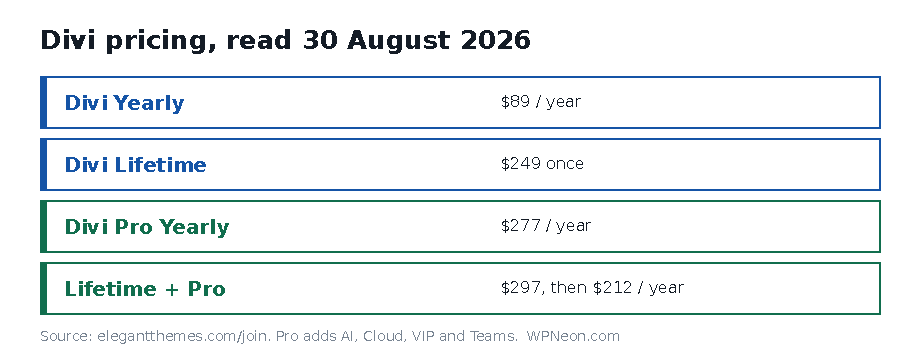
Divi pricing, read on 30 August 2026
These are the prices listed on the Elegant Themes pricing page (affiliate link) on 30 August 2026. They are what the page said on that date, not a forecast.
| Plan | Price | What it adds |
|---|---|---|
| Divi Yearly | $89 billed yearly ($7.42/mo) | Divi, Extra, Bloom, Monarch, Divi Dash, updates and support while active |
| Divi Lifetime | $249, one-time | The same products, with updates and support described as “for life” |
| Divi Pro Yearly | $277 billed yearly ($23.08/mo) | Adds Divi AI, Divi Cloud, Divi VIP and Divi Teams |
| Divi Lifetime + Pro | $297 today, then $212 per year | Lifetime Divi and Divi Dash; the Pro services renew annually |
Two details worth reading twice. The Lifetime + Pro plan is not a lifetime price for everything — the one-time payment covers Divi and Divi Dash, and the Pro services renew at $212 a year. And the refund window is 30 days, described as no-questions-asked, which is the safest way to find out whether the builder suits how you work.
Elegant Themes states 974,872 customers and “25k+ five-star reviews” on the same page. Both are the vendor’s own figures, self-reported and not independently auditable. Divi is not in the WordPress.org directory, so there is no third-party install count, star rating or “tested up to” version to check them against — a cross-check that is routinely available for free plugins and simply is not here.
If you are hunting for a code, our Elegant Themes discount page covers what a Divi discount actually looks like in practice.
What Divi 5 changed, and why the old lock-in warning is out of date
The current release is Divi 5.11.1, dated 19 August 2026 in the Elegant Themes Divi 5 update status changelog. Divi 5 is a rewrite, and the headline change is architectural.
In Divi 4, every module was stored in your post content as a shortcode. That is what generations of reviews, this one included, called lock-in: uninstall Divi and your pages fill with unrendered [et_pb_section] tags. Elegant Themes’ post Divi 5 Waves Goodbye To Shortcodes sets out why they dropped it: shortcode parsing “is less efficient because it doesn’t have a proper hierarchy,” shortcodes were never built for deep nesting, “one rogue character could crash the whole system,” and they do not align with WordPress’s own block structure.
Being precise about what this does and does not fix:
- Fixed: the specific ugliness of shortcode residue, and the fragility that came with it.
- Not fixed: you are still storing layouts in Divi’s format. Leaving Divi still means rebuilding pages. That is true of every page builder and it is the honest version of the lock-in argument.
- Unproven: Elegant Themes argues the change is faster but publishes no numbers at all — no percentage, no benchmark. We are not disputing it; we are recording that there is nothing to dispute.
Divi 5 also ships a Migrator for moving Divi 4 sites across. Do that on a staging copy. Third-party Divi module packs are the usual casualty of a major-version move, and the changelog shows backward compatibility for them is still active work.
Performance: what Divi gives you and what it costs
Divi’s performance controls live in Divi > Theme Options > Performance, and Elegant Themes documents eleven of them in its Dynamic CSS help article. Its own published figures: Dynamic CSS cut a stylesheet from 860KB to 54KB in its testing, Dynamic Icons takes the icon font from 90KB to 6KB, and JavaScript optimisation halved the base script.
Two of those settings are worth knowing about before you rely on them. Dynamic Icons is off by default on any site running a child theme or a custom module — Elegant Themes’ own wording — which describes a large share of real Divi installs. And deferred jQuery moves itself back into the header whenever an enqueued script declares jQuery as a dependency, so one ordinary plugin can undo it silently. We wrote that up in full in why a Divi site is slow, and which slow you actually have.
Every figure above is Elegant Themes’ own, and vendor figures are best-case by construction. If raw speed is the deciding factor, a block theme with no builder starts lighter — see our notes on the fastest WordPress themes, Kadence and Blocksy.
What Divi needs from your server
Divi is more demanding than a lightweight theme, and undersized hosting is the most common reason people conclude the builder is broken. Elegant Themes publishes its floor in the builder timeout article: memory_limit 128M, post_max_size 64M, max_execution_time 120, upload_max_filesize 64M, max_input_time 60 and max_input_vars 1000, on PHP 8 or later — PHP 7.4 at absolute minimum.
Budget shared hosting frequently ships below several of those. Check yours in Tools > Site Health > Info > Server before you buy, not after. Our WordPress hosting notes and the Kinsta versus WP Engine comparison cover what a host has to provide before any theme performs.
Where Divi loses
The learning curve is real and front-loaded. Divi’s flexibility comes from a settings panel with dozens of options on every module. The first week is slower than a block theme, not faster. People who abandon Divi usually abandon it in that week.
You are still committing to a format. Divi 5 removed shortcodes but replaced them with Divi’s own structure. Migrating away means rebuilding. Weigh that against Beaver Builder and Themify Ultra, which make the same trade with different tooling.
Divi 5 is young. It reached 5.11.1 on 19 August 2026 and the changelog still shows active work on third-party module compatibility. If your site depends on a Divi add-on pack, confirm that pack supports Divi 5 before you migrate.
The interesting features are moving into Pro. Divi AI, Cloud, VIP and Teams are not in the $89 plan. The base membership is not shrinking, but the growth is happening in a tier that costs three times as much.
Support is chat and email only. Elegant Themes advertises 24/7 chat and email; under-30-minute responses are a Divi VIP feature, which is a Pro subscription.
Who Divi suits, and who should look elsewhere
Divi suits you if you build sites for clients and want one design system across all of them, if you value a large prebuilt layout library, or if the lifetime licence economics matter because you run many sites. See sites built with Divi for what people actually ship with it, Divi blog child themes for a faster start, and our guide to building a WooCommerce store with the Divi Theme Builder.
Look elsewhere if you publish mostly text and want the lightest possible page, if you are on shared hosting you cannot upgrade, or if portability out of the builder is a hard requirement rather than a preference.
See Divi at Elegant Themes
Affiliate link.
Frequently asked questions
How much does Divi cost in 2026?
As listed on the Elegant Themes pricing page on 30 August 2026: $89 a year, or $249 as a one-time lifetime payment. Divi Pro is $277 a year, and Lifetime plus Pro is $297 today with the Pro services renewing at $212 a year afterwards.
Does Divi still lock you in with shortcodes?
No. Divi 5 removed shortcodes entirely and replaced them with a structured storage format. The old warning about unrendered shortcode tags after uninstalling no longer applies. You are still committing to Divi’s format, so leaving still means rebuilding pages.
Is the Divi lifetime licence worth $249?
It pays for itself in under three years against the $89 annual plan, so it is straightforward maths if you intend to keep using Divi. Note that Lifetime plus Pro is not lifetime for everything: the Pro services renew at $212 a year. Current Divi pricing (affiliate link).
Is Divi good for beginners?
It is capable rather than gentle. The first week is harder than a block theme because every module carries dozens of settings. Once past that, non-developers build layouts that would otherwise need code. The 30-day refund window is the sensible way to find out.
Should I update an existing site to Divi 5?
Yes, but on a staging copy first, using the Migrator that Elegant Themes ships. Divi 5 reached 5.11.1 on 19 August 2026 and third-party module compatibility is still active work in the changelog. Confirm your add-on packs support it before you migrate.
What does Divi include besides the theme?
The membership includes the Divi Builder plugin, the Extra magazine theme, the Bloom email opt-in plugin, the Monarch social sharing plugin and Divi Dash. Divi AI, Divi Cloud, Divi VIP and Divi Teams are sold separately in the Pro tiers.
Sources read on 30 August 2026: the Elegant Themes join and lifetime membership pages, the Divi 5 update status changelog, the Dynamic CSS and frontend performance help article, the Divi Builder timeout article, and the Elegant Themes blog post on shortcode removal in Divi 5. If you are giving an AI assistant access to a WordPress site, start with WordPress MCP security and our breakdown of which WordPress MCP server packages are maintained.
