WordPress MCP Plugin: 7 Options Compared
The short version
Seven WordPress MCP plugins are worth knowing about. Two of them — Premium Addons for Elementor and AI Engine — carry 600,000 and 100,000 active installations, and neither figure has anything to do with MCP. They are an Elementor widget pack and a chatbot plugin that each added MCP tools recently. Their star ratings were earned by other features.
The five purpose-built options have between 100 and 10,000 installations and between zero and 27 reviews. Every one of the seven was updated within the past week. There is no mature choice here yet, and any page telling you otherwise is selling one of them.
Picking a WordPress MCP plugin in 2026 means choosing which software gets write access to your site on behalf of an AI agent. That is a security decision before it is a features decision, and the buying advice available is unusually bad — not because it is wrong, but because of who wrote it.
Everything below comes from each plugin’s own WordPress.org directory listing, read on 31 August 2026. Version numbers, installation counts, review counts, PHP floors and tested-up-to values are the repository’s figures, not the vendors’.
What separates one WordPress MCP plugin from another
Most recommendations you will find for these plugins are published by companies that sell one of them, and they tend to conclude that their own is best. That does not make the plugins bad, but it does mean the ranking is doing none of your work for you. Four things actually decide which one fits.
Whether it was built for MCP, or had MCP added to it. Two of the seven below are long-established plugins that gained MCP tools recently. Their very large installation counts and star ratings were earned by entirely different features, so those numbers say nothing about the MCP side.
How it authenticates. Some use OAuth, some use a WordPress application password, some offer both. An application password is quicker to set up and harder to scope narrowly. Where a plugin supports OAuth, that is the better default.
What the tools can reach. Posts and media is one level of risk. Themes, files and the database is another entirely — a plugin advertising “edit themes” is offering an AI agent the ability to write executable code on your server.
How much of it is free. All seven are free to install. Not all of them keep the tools you will want in the free tier.
The seven compared
Inclusion rule: it must be installable from the WordPress.org plugin directory and it must expose MCP tools. That excludes the official WordPress MCP Adapter, which is distributed through GitHub rather than the directory, and Automattic’s archived wordpress-mcp. Both are covered separately in which WordPress MCP servers are maintained and which are archived.
| Plugin | Version | Installs | Reviews | Needs | Tested to |
|---|---|---|---|---|---|
| Premium Addons for Elementor | 4.11.101 | 600,000+ | 4.9 (1,677) | WP 6.6, PHP 7.4, Elementor | 7.1 |
| AI Engine | 3.7.3 | 100,000+ | 4.9 (862) | WP 6.0, PHP 8.1 | 7.1 |
| WPVibe | 1.15.5 | 10,000+ | 4.9 (27) | WP 6.0, PHP 7.4 | 7.1 |
| Royal MCP | 1.4.44 | 10,000+ | 5.0 (7) | WP 5.8, PHP 7.4 | 7.1 |
| Easy MCP AI | 1.7.16 | 9,000+ | 5.0 (8) | WP 6.0, PHP 7.4 | 7.1 |
| Enable Abilities for MCP | 2.5.2 | 2,000+ | 5.0 (9) | WP 6.9, PHP 8.0, MCP Adapter | 7.0.4 |
| MCP Server for WordPress (AtlasAI) | 1.7.0 | 100+ | none | WP 6.8, PHP 7.4 | 7.1 |
Every one of the seven was last updated within seven days of 31 August 2026, and six of the seven declare compatibility with WordPress 7.1. None carries a closure notice or the directory’s “hasn’t been tested with the latest 3 major releases” banner. On the maintenance question, all seven pass.
What the installation counts do not tell you
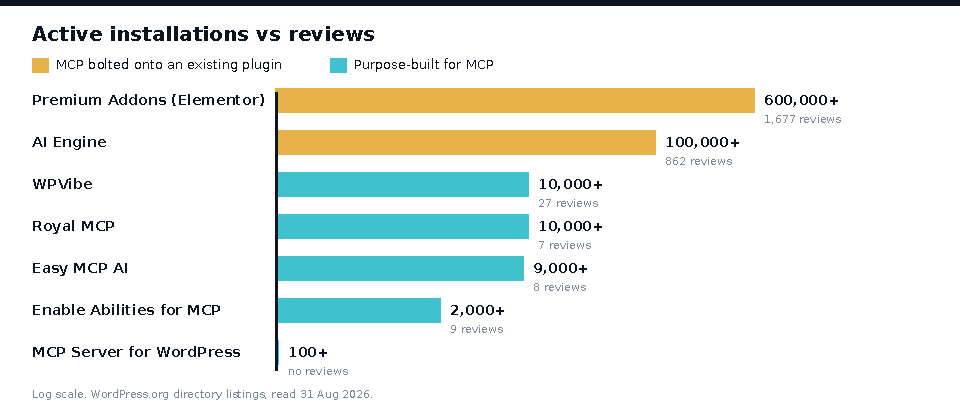
The two largest entries are not MCP plugins. Premium Addons for Elementor is a widget pack with 600,000 installations built up over years, which recently added AI Abilities. AI Engine is a chatbot and AI framework with 100,000 installations and 862 reviews accumulated the same way. Their MCP features are new; their numbers are not.
This matters because installation count is the metric people actually use to pick a plugin, and here it measures the wrong product. If you install Premium Addons for its MCP tools, you are an early adopter of a feature with no independent track record, on a plugin whose 4.9-star rating was earned by carousels and mega menus.
Look instead at review counts on the purpose-built five: 27, 9, 8, 7, and zero. That is the real size of the evidence base for WordPress MCP plugins in August 2026. It is not enough to rank anything on.
Each WordPress MCP plugin, and where it loses
Premium Addons for Elementor — 600,000+ installs
Its listing describes “35+ tools that work on your real Elementor site” and says you can “connect Claude, ChatGPT, Cursor, or any MCP client to your site in one click with OAuth or use an application password.” For an agency already building in Elementor, having an agent create and duplicate templates is a genuine workflow change.
Where it loses: its own FAQ states “you cannot use Premium Addons without Elementor.” The tools are Elementor-scoped, so this is not a general site-management MCP server, and if you are not on Elementor it is not a candidate at all. See the directory listing.
AI Engine — 100,000+ installs
The listing says “AI Engine turns your WordPress site into an intelligent MCP server. AI agents like ChatGPT, Claude, Claude Code, and OpenClaw can connect directly.” It is the most established plugin here by a wide margin, and MCP is included in the free version.
Where it loses: the “Extra MCP Tools” — plugin, theme, database, WooCommerce and Polylang management — are listed as Pro-only. Those are precisely the capabilities most people want an agent for, so the free MCP support is narrower than the headline suggests. It also has the highest PHP floor of the seven at 8.1, which rules out some older shared hosting. See the directory listing.
WPVibe — 10,000+ installs
“Secure WordPress MCP server. Connect Claude, ChatGPT, Cursor & any AI agent via MCP to manage content, edit themes & automate your site.” It has the most reviews of the purpose-built group at 27, and is the most recently updated of the seven.
Where it loses: “edit themes” means an agent with file-write access, which is the highest-consequence permission any of these grant. Twenty-seven reviews is the largest sample here and still a small one. Version 1.15.5 on a plugin this young means the release cadence is fast, which cuts both ways.
Royal MCP — 10,000+ installs
“The most complete WordPress MCP server — 170+ tools, OAuth 2.0, and nothing leaves your site.” OAuth 2.0 rather than application passwords is a real security distinction, and the self-hosted claim is checkable: the plugin runs on your server.
Where it loses: seven reviews against 10,000+ installations. It also sits at version 1.4.44 — a patch number that implies dozens of releases in a short life. “Most complete” is the vendor’s own claim, and with 170+ tools against Easy MCP AI’s 243 it is not the largest by tool count. See the directory listing.
Easy MCP AI — 9,000+ installs
“Connect Claude, ChatGPT & any AI to WordPress. Manage your entire site by chat — content, media, GA4, Search Console, SEO & more. 243 tools. Free.” The GA4 and Search Console integrations are unusual: most of these plugins expose WordPress, not the analytics stack around it.
Where it loses: 243 tools is the largest surface area of any plugin here, and tool surface is attack surface — every tool is another thing an agent can be talked into calling. Eight reviews. And the external data integrations mean credentials for Google properties now sit in WordPress.
Enable Abilities for MCP — 2,000+ installs
“Manage which WordPress Abilities are exposed to MCP servers. Supports WooCommerce, The Events Calendar, and any custom post type.” This is the only entry on the official architectural path: it is a control panel over the MCP Adapter and the Abilities API introduced in WordPress 6.9, not a server in itself.
Where it loses: it is not standalone. It requires WordPress 6.9 or higher, PHP 8.0, and the MCP Adapter installed separately. It is also the only one of the seven tested to 7.0.4 rather than 7.1 — not an abandonment signal at two days since its last update, but the one compatibility gap in the group. See the directory listing.
MCP Server for WordPress (AtlasAI) — 100+ installs
“Secure MCP server for WordPress. Connect Claude, ChatGPT & Gemini via OAuth 2.1. Unlimited AI abilities, WooCommerce tools, RBAC, editor AI.” OAuth 2.1 and role-based access control are the most specific security claims of any listing here.
Where it loses: 100+ installations and no reviews at all. There is no user evidence about it whatsoever, and its security claims are unverified by anyone but its author.
What none of them fix
Every plugin here connects an AI agent to a live WordPress site, and every one of them is only as safe as the permission model behind its tools. The tool list is not the security boundary; the permission callback on each tool is. A plugin advertising 243 tools and one advertising 35 are making the same underlying promise, and neither number tells you what an agent is actually allowed to do with your content.
That is a longer subject than a comparison table, and it is covered properly in what each WordPress MCP setup actually exposes. The short form: use an account with the narrowest role that does the job, prefer OAuth over application passwords where the plugin offers it, and never grant theme or plugin file editing to an agent on a site you cannot restore.
How to choose
You build in Elementor. Premium Addons, because its tools understand Elementor templates and nothing else here does. Not a candidate otherwise.
You want the most established plugin and a chatbot too. AI Engine, with the caveat that useful site management sits behind Pro and you need PHP 8.1.
You want broad site management, free. Easy MCP AI, Royal MCP or WPVibe. Pick on authentication rather than tool count: Royal MCP advertises OAuth 2.0, Easy MCP AI reaches furthest into GA4 and Search Console, WPVibe has the most user reviews of the three.
You want to stay on the path WordPress core is taking. The MCP Adapter plus Enable Abilities for MCP. You need WordPress 6.9 and you will assemble two pieces, and in exchange you are not betting on a single vendor’s plugin surviving. Start with the maintained-versus-archived comparison.
You want the strictest access control. AtlasAI’s MCP Server for WordPress claims OAuth 2.1 and RBAC, but with 100 installations and no reviews it is a bet, not a recommendation.
You are not sure yet. Waiting is defensible. Every plugin here changed in the past week, and the evidence base is between zero and 27 reviews. Nothing is lost by revisiting this in three months.
Frequently asked questions
What is the best WordPress MCP plugin?
There is no defensible answer yet. The five purpose-built options have between zero and 27 reviews, and the two with large install bases earned those numbers as an Elementor widget pack and a chatbot. Choose on fit — Elementor, budget, PHP version, authentication method — rather than on any ranking.
Is there an official WordPress MCP plugin?
Not in the plugin directory. The official route is the WordPress MCP Adapter, distributed through GitHub, which republishes abilities registered via the Abilities API added in WordPress 6.9. Enable Abilities for MCP is a directory plugin that puts a control panel on top of that adapter.
Are these WordPress MCP plugins free?
All seven are free to install from the directory. AI Engine gates its Extra MCP Tools — plugin, theme, database, WooCommerce and Polylang management — behind a Pro version. Premium Addons requires Elementor, which has its own free and paid tiers. The rest advertise their MCP tooling as free.
Which WordPress MCP plugin supports OAuth?
Royal MCP advertises OAuth 2.0, AtlasAI’s MCP Server for WordPress advertises OAuth 2.1, and Premium Addons offers OAuth or an application password. Application passwords are simpler to set up and harder to scope narrowly, so OAuth is the better default where a plugin supports it.
Can an AI agent break my site through an MCP plugin?
Yes, if you grant it the permissions to. Plugins advertising theme or file editing give an agent the ability to write executable code. Connect with the narrowest WordPress role that does the job, and keep restorable backups before giving any agent write access.
Do install counts tell me which MCP plugin is best?
Not here. Premium Addons’ 600,000 and AI Engine’s 100,000 installations were accumulated by features unrelated to MCP. The purpose-built plugins range from 100 to 10,000. Review counts are a closer signal, and at 27 or fewer they are still too small to rank on.
Related plugin research
Other pages checked against the plugin directory the same way: WordPress payment gateway plugins, five of which are closed and our WhatsApp plugin round-up, where 11 were verified and 2 abandoned. Other plugin and workflow research: WordPress plugins for cloud storage, the practical ways to clone a WordPress site, and Gutenberg-native themes. On the page-builder side, Beaver Builder against Divi and how to import and export Divi layouts.
All figures come from each plugin’s WordPress.org directory listing, read 31 August 2026: Easy MCP AI, AI Engine, Royal MCP, WPVibe, Premium Addons for Elementor, Enable Abilities for MCP and MCP Server for WordPress. How WPNeon checks things is set out in how we review WordPress products.
