HostArmada Review: Prices, Data Centres, Verdict
Buy Web Warp at $3.29 a month. It is the plan worth having: unlimited websites, 4 cores and 4 GB of RAM, room for roughly 60,000 visitors a month and 14 daily backups, and it renews at $16.45 rather than the $19.75 the top plan asks. Take Start Dock at $1.99 only if you are certain you will never add a second site. The genuinely unusual thing here is the refund window: 45 days on shared hosting, where most hosts give 30.
Also read: Best WordPress Hosting

 Free SSL from Sectigo on all domains, a web application firewall filtering HTTP traffic at the application layer against SQL injection and similar attacks, DDoS protection with per-IP throttling, and around-the-clock malware scanning.
The 7 to 21 daily backups are the part that will actually save you one day. Most sites are not compromised by a clever attack; they are broken by a bad plugin update, and the fix is restoring yesterday. Twenty-one restore points on Speed Reaper is genuinely useful.
Free SSL from Sectigo on all domains, a web application firewall filtering HTTP traffic at the application layer against SQL injection and similar attacks, DDoS protection with per-IP throttling, and around-the-clock malware scanning.
The 7 to 21 daily backups are the part that will actually save you one day. Most sites are not compromised by a clever attack; they are broken by a bad plugin update, and the fix is restoring yesterday. Twenty-one restore points on Speed Reaper is genuinely useful.
 That familiarity is a real advantage over hosts with a bespoke dashboard. Every cPanel tutorial written in the last fifteen years applies to your site.
Who should buy which plan
- One blog, smallest possible bill: Start Dock, $1.99 a month, renewing at $9.95. One website only.
- Two or more sites, or you expect to add one: Web Warp, $3.29 a month, renewing at $16.45. Unlimited websites, and the gap over Start Dock is $1.30 a month.
- A busy site or a small shop: Speed Reaper, $3.95 a month, renewing at $19.75. Six cores, 6 GB of RAM and 21 daily backups.
- An Australian, Singaporean or Indian audience: any plan, but choose the local data centre at checkout. That choice will do more for your speed than the plan tier does.
- You want to test properly before committing: shared hosting, because that is where the 45-day guarantee applies. VPS and dedicated plans give you 7 days.
- A site that must not go down: not budget shared hosting, here or anywhere. Managed hosting exists for that.
Shared hosting prices
The intro prices below need a three-year term, and each comes with two months and a domain name free. The renewal price is the one that matters, because you will pay it for longer.- Start Dock: $1.99 a month, renewing at $9.95. 15 GB NVMe, 2 cores, 2 GB RAM, 1 website, around 30,000 visitors a month, 7 daily backups.
- Web Warp: $3.29 a month, renewing at $16.45. 30 GB NVMe, 4 cores, 4 GB RAM, unlimited websites, around 60,000 visitors a month, 14 daily backups.
- Speed Reaper: $3.95 a month, renewing at $19.75. 40 GB NVMe, 6 cores, 6 GB RAM, unlimited websites, around 120,000 visitors a month, 21 daily backups.
VPS and dedicated prices
VPS plans need annual billing for the intro price and carry a 7-day money-back guarantee, not the 45-day one:- Spark: $3.69 a month, renewing at $8.20. 40 GB NVMe, 1 core, 1 GB RAM, 2 TB bandwidth.
- Flux: $5.18 a month, renewing at $11.52. 80 GB NVMe, 2 cores, 4 GB RAM, 4 TB.
- Fusion: $10.74 a month, renewing at $21.48. 160 GB NVMe, 4 cores, 8 GB RAM, 5 TB.
- Ignition: $16.89 a month, renewing at $42.23. 320 GB NVMe, 8 cores, 16 GB RAM, 8 TB.
- Lift Off: $81.95 a month, renewing at $163.90. 160 GB NVMe, 4 cores, 8 GB RAM, 5 TB.
- Low Orbit: $114.95 a month, renewing at $229.90. 320 GB NVMe, 8 cores, 16 GB RAM, 6 TB.
- High Orbit: $180.95 a month, renewing at $361.90. 640 GB NVMe, 16 cores, 32 GB RAM, 7 TB.
Data centres, and why this is the important section
HostArmada runs nine locations: San Francisco, Dallas, Newark, Montreal, London, Frankfurt, Mumbai, Singapore and Sydney. You choose one at checkout, and the site publishes IP addresses for each so you can ping them and see for yourself before you buy. Sydney and Singapore deserve the mention, because very few hosts at this price offer either. In our test of Australian WordPress hosting, the round trip from Sydney to a US data centre added more latency than any caching setting could claw back. If your readers are in Australia or South East Asia, picking the near data centre is the single most valuable decision on this page, and it is free. Conversely, if your audience is in the UK and you accept the default US location because you clicked through quickly, you have given away the main thing you came for.Uptime, and what a 100% claim actually means
HostArmada advertises 100% network uptime alongside a 99.9% uptime figure, and it is worth separating those two, because they are not the same promise. Network uptime covers the network layer: the routers and links between the internet and the data centre. Your website being reachable depends on much more than that, including the web server, PHP, your database and your own plugins. A host can hold network uptime at 100% while your site is down. No provider can guarantee your website is up 100% of the time, and nobody should claim to. It is also worth knowing what a monitoring test proves. Point an uptime monitor at any competent host for a few weeks and it will very often report 100%, because 99.9% allows about 43 minutes of downtime a month and a short window will usually miss it. A 100% reading over a short period tells you nothing broke while you were watching. It is not evidence that a 100% claim is credible. So judge this on the things you can hold them to: the published 99.9% commitment, the 45-day refund window on shared plans, and the 7 to 21 daily backups.What comes free
Every shared plan includes free SSL for all websites, free cPanel, automatic daily backups, and free website migration, with one to five transfers depending on the tier. A free domain comes with the three-year sign-up. The caching stack is LiteSpeed and Memcached with Brotli compression, and there is a one-click WordPress installer and a drag-and-drop site builder. For a plan at this price, cPanel plus LiteSpeed is a good combination, and it is more than several better-known budget hosts include.Security
Free SSL from Sectigo on all domains, a web application firewall filtering HTTP traffic at the application layer against SQL injection and similar attacks, DDoS protection with per-IP throttling, and around-the-clock malware scanning.
The 7 to 21 daily backups are the part that will actually save you one day. Most sites are not compromised by a clever attack; they are broken by a bad plugin update, and the fix is restoring yesterday. Twenty-one restore points on Speed Reaper is genuinely useful.
Interface
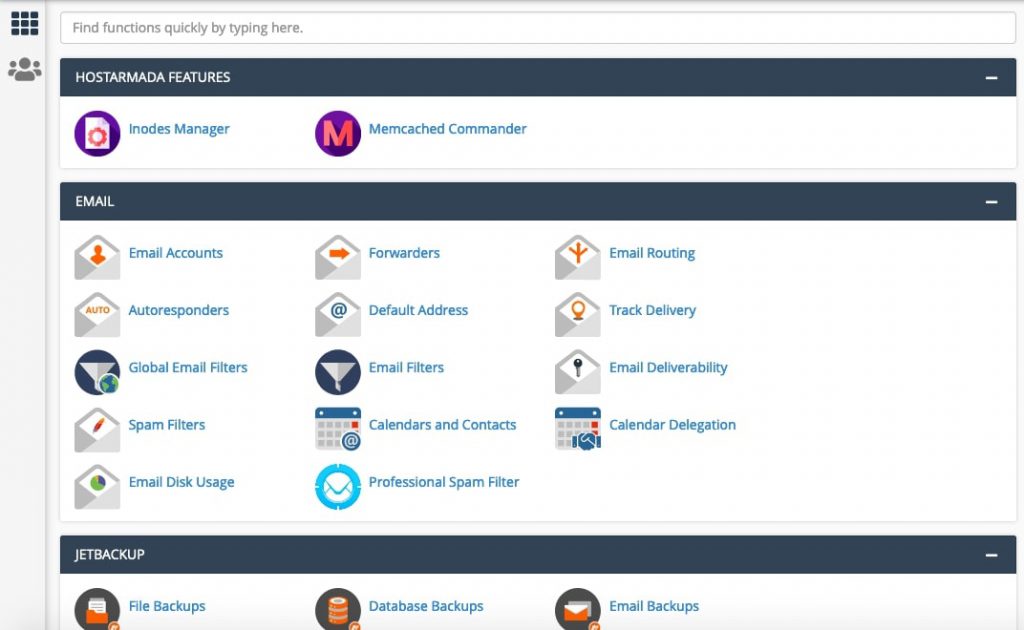
Two panels. The Client Area holds billing, orders and domains, and works on a phone. cPanel handles the file manager, databases, subdomains and everything technical, and if you have used cPanel anywhere else this will feel identical.
That familiarity is a real advantage over hosts with a bespoke dashboard. Every cPanel tutorial written in the last fifteen years applies to your site.
