Astra WooCommerce Store with Elementor: Setup Guide
Some links on this page are affiliate links. If you buy through one, WPNeon earns a commission at no extra cost to you. It does not change what we recommend – see how we review.
The short version
You can build a working Astra WooCommerce store with Elementor for nothing: WooCommerce, the free Astra theme, free Elementor and the Starter Templates plugin cover the shop, product, cart and checkout pages plus a designed homepage. Do that first. This suits anyone launching a small catalogue without a developer. The thing to avoid is buying Astra Pro on the assumption it covers unlimited sites – as of 4 September 2026 the Astra Pro + AI plan is $99 a year for up to 3 websites and renews at $149, a 50.5% step up at renewal. Older tutorials, including an earlier version of this page, still describe an unlimited licence.
Versions and install counts read from WordPress.org, prices from wpastra.com and elementor.com, on 4 September 2026.
An Astra plus Elementor WooCommerce store is a three-layer build: WooCommerce supplies the store logic, Astra supplies a light theme that already styles WooCommerce templates, and Elementor designs the pages WooCommerce does not generate. The reason this combination is recommended so often is that each layer has a genuinely usable free version, so the whole store can go live before you spend anything. This guide sets out what you install, what each layer actually controls, what the free tier does not do, and what upgrading really costs.
What you install, and what it costs
Four components. Three are free with a paid upgrade path; the Starter Templates plugin is free outright.
| Component | Version | Active installs | Rating | Updated | Paid tier |
|---|---|---|---|---|---|
| WooCommerce | 11.1.0 | 7+ million | 4.5 (4,821 reviews) | 23 hours before we read it | Free core; paid extensions |
| Astra theme (affiliate) | 4.13.10 | 1+ million | 4.9 (6,518 reviews) | 19 Aug 2026 | Astra Pro + AI, $99/yr (renews $149), 3 sites |
| Elementor (affiliate) | 4.2.4 | 10+ million | 4.5 (7,297 reviews) | 3 days before we read it | Elementor Pro Essential, $49/yr, 1 site |
| Starter Templates | 4.7.5 | 1+ million | 4.9 (4,745 reviews) | 2 weeks before we read it | Free; premium templates need an Astra plan |
Read 4 September 2026. Versions, install counts, ratings and the relative “updated” values are as WordPress.org displayed them on that date – we quote its own wording rather than converting the relative dates, because the pages do not publish exact timestamps. WordPress.org reports installs in buckets (“7+ million”), so these are floors, not precise counts. Prices are from wpastra.com/pricing and elementor.com/pricing, both read the same day; Astra’s $99 and $199 figures are introductory rates that the same page says renew higher. Elementor’s pricing page rendered a figure only for its Essential tier when we read it, so we do not quote the Advanced, Advanced Solo or Expert prices.
The figure nobody publishes: $544 over three years, or $0
Add the two upgrades most people eventually consider – Astra Pro + AI and Elementor Pro Essential – and price them over three years using the vendors’ own introductory and renewal figures. Year one is $99 + $49 = $148. Years two and three are $149 + $49 = $198 each. Three-year total: $544. The same store built entirely on the free tier costs $0 in software.
Derivation: Astra Pro + AI at $99 introductory and $149 renewal (wpastra.com/pricing, read 4 September 2026) plus Elementor Pro Essential at $49 a year (elementor.com/pricing, same date), summed across three annual terms and assuming the renewal rate holds. Two things fall out of it. First, the renewal step on Astra Pro is +50.5% (149 / 99 = 1.505), so the year-one price is not the price. Second, hosting, a domain and any paid WooCommerce extensions sit on top of all of this and are not included.
For context on scale rather than cost: the four components report 7+ million, 10+ million, 1+ million and 1+ million active installs, so at minimum 19 million install-instances between them. Those counts overlap heavily – one store running all four is counted four times – so read it as evidence that the stack is thoroughly trodden ground, not as a site count.
Step 1: Install WooCommerce, then Astra
Install and run through WooCommerce’s own setup wizard first, before the theme. It creates the shop, cart, checkout and account pages and sets your currency and tax basis; doing it after a theme import means reconciling two sets of pages.
Then install Astra (affiliate) from Appearance, Themes, Add New – search “Astra”, install, activate. Astra is the right theme for this job because it styles WooCommerce’s own templates rather than replacing them, and it ships no page builder of its own, which is why it stays light. It is one of the reasons it appears in our list of the fastest WordPress themes, and our Astra review covers where the free version stops.
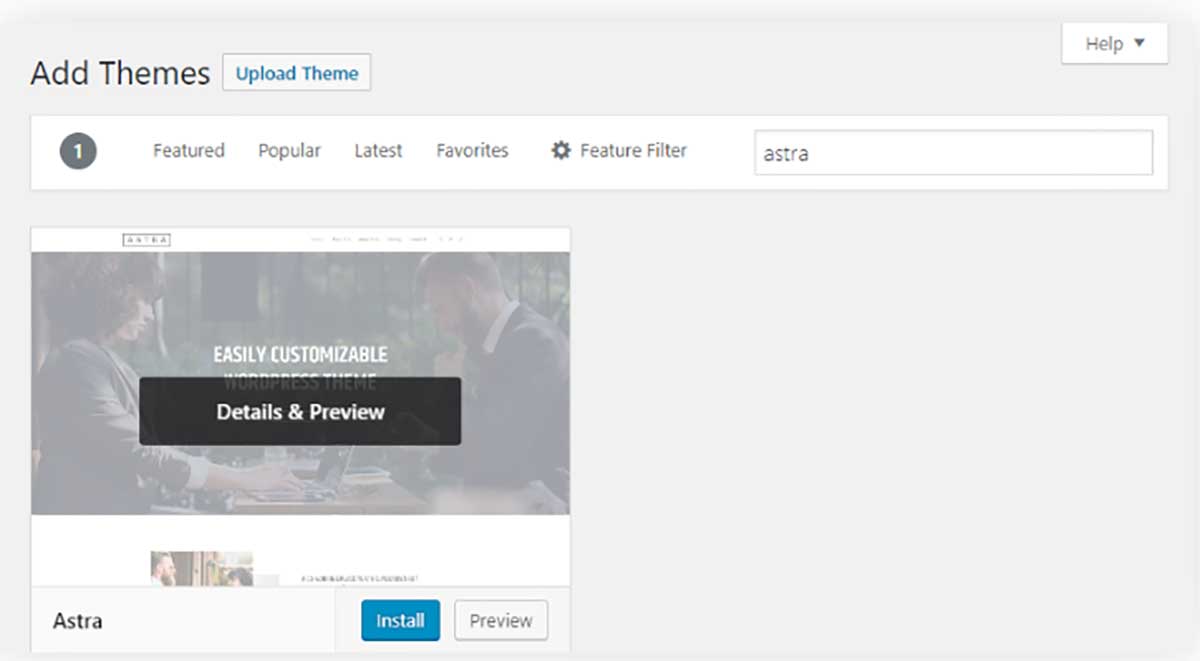
Step 2: Import a starter template
Astra’s designs arrive through the separate Starter Templates plugin, not the theme. Install it, then choose Elementor as your page builder when prompted – that filters the library to Elementor-built templates rather than Gutenberg ones, which matters because the two are not interchangeable later.
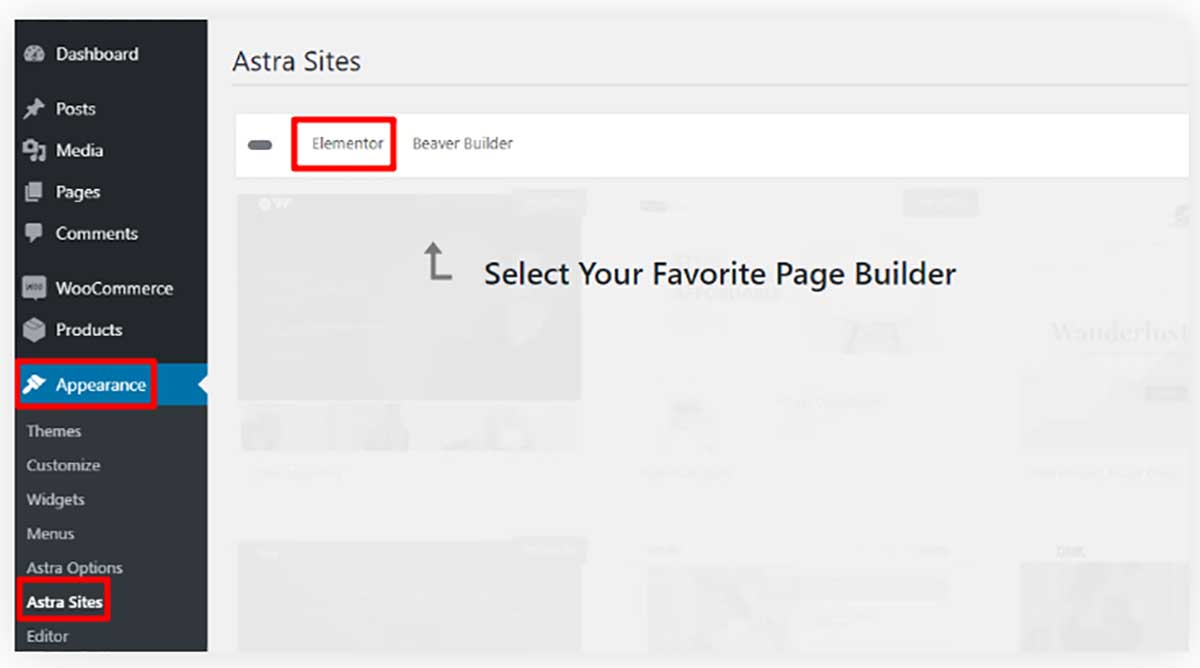
Filter to the eCommerce templates and preview before importing. Many templates are free; those marked as premium need a paid Astra plan. Preview also prompts you to install Elementor itself if it is not already active.

Import overwrites. Importing a starter site replaces your current design settings and adds its own pages and demo products. Do it on a fresh install or a staging copy, never on a store that already has content you care about. This is the single most common way people damage a live site following this tutorial.

Step 3: Set up the shop in the Customizer, not Elementor
This is the part most guides get backwards. The store’s repeating templates – the shop grid, the single product page, the cart – are controlled from Appearance, Customize, because they are WooCommerce templates that Astra styles. Elementor does not touch them on the free tier.

Under Layout, WooCommerce you get three areas:
- Shop. Products per page, whether short descriptions show in the grid, and column count (two, three or four). Three columns is the safe default; four gets cramped on tablets.
- Single product. Product page layout and whether breadcrumbs show.
- Cart. Cross-sell and upsell display on the cart page. Worth enabling early – it is free revenue on a page the customer has already committed to.
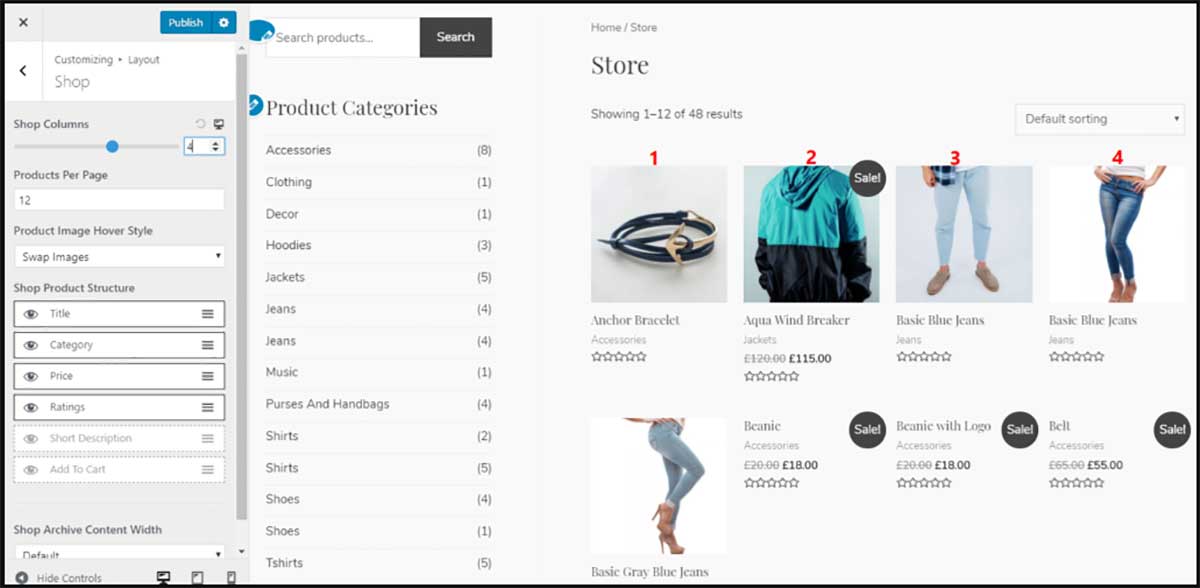
The cart hands off to checkout, and the checkout is only as sound as the gateway behind it. Several older gateway plugins have been closed on WordPress.org, so check the payment gateway plugins that are still maintained before you pick one.
The WooCommerce panel in the main Customizer sidebar adds the store notice (a site-wide banner for a sale or launch), product catalogue text and product image sizes. Set image sizes before you upload a catalogue – changing them afterwards means regenerating every thumbnail.

Step 4: Use Elementor for the pages WooCommerce does not generate
Elementor’s job here is the homepage, the about page, landing pages and any campaign page – the ones with no template because they are one-offs. Open the page and choose Edit with Elementor, then edit text in place and drag elements where you want them.
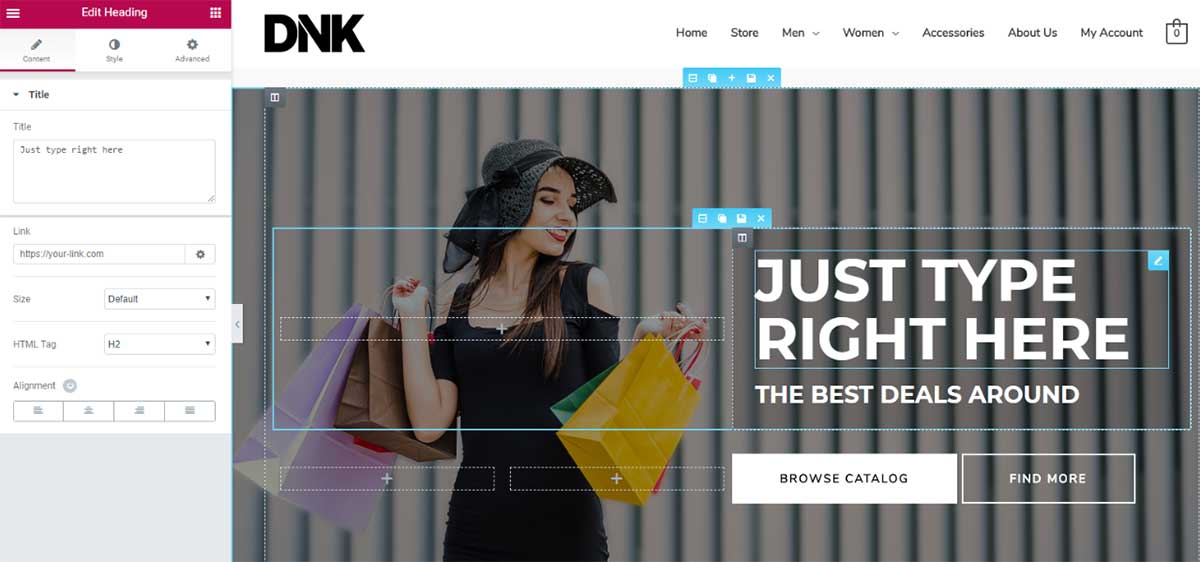
Astra also works with other builders if you prefer – Beaver Builder (affiliate) and Brizy (affiliate) among them – but the Starter Templates library is deepest for Elementor and Gutenberg, so switching builders costs you the template head start.
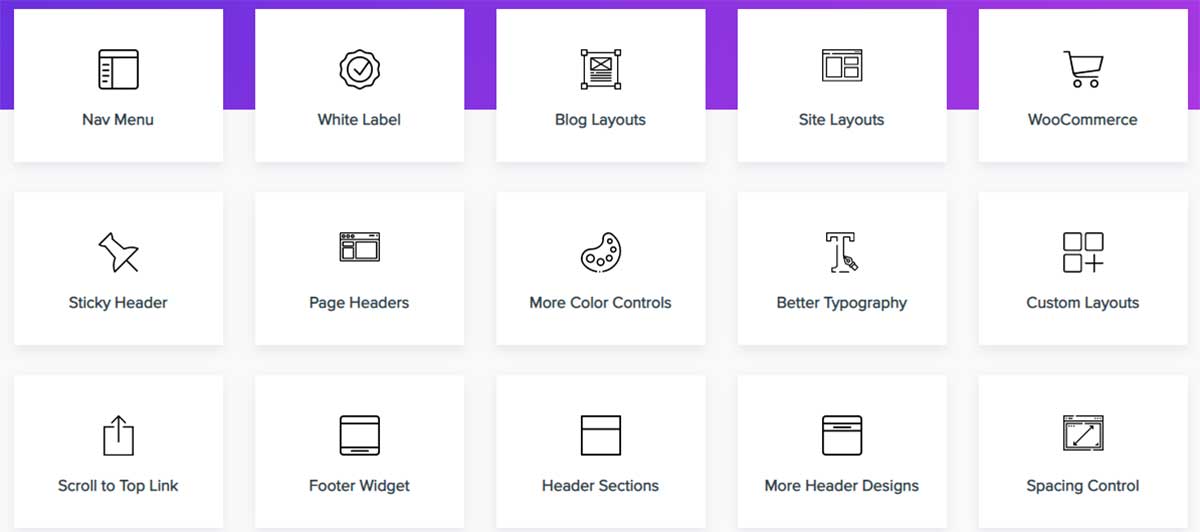
Where the paid tiers earn their money: Elementor Pro (affiliate) adds WooCommerce widgets and a Theme Builder, which is what lets you redesign the product and shop templates in Elementor instead of the Customizer. Astra Pro adds the header and footer builder plus deeper WooCommerce styling. Neither is needed to launch. The alternative to a three-piece stack is one theme with its own builder, which we weigh up in Beaver Builder vs Divi on cost, speed and lock-in; if you go the Divi route, layouts import through the Divi Library instead, covered in our Divi layout import walkthrough.
Where this stack loses
- Two places to change one thing. Shop templates live in the Customizer, one-off pages live in Elementor. Until Elementor Pro’s Theme Builder is in play you are switching between two editors with different conventions, and it is genuinely confusing at first.
- Astra Pro is not unlimited. The entry plan covers 3 websites, not unlimited. Anyone repeating the old advice is costing you money if you run more sites.
- Introductory pricing. Astra Pro’s $99 becomes $149 on renewal, a 50.5% increase, and the higher toolkits step up further ($199 to $299, $279 to $429). Budget from the renewal figure.
- Elementor adds weight. Astra’s whole appeal is that it is light. Every Elementor page carries the builder’s CSS and JavaScript, so a heavily built homepage undoes some of what the theme was chosen for. Keep template pages out of Elementor where the Customizer can do the job.
- The import is destructive. Starter Templates replaces existing design settings. There is no partial import.
- Builder lock-in on the pages you build. Elementor stores layouts in its own format. Migrating away means rebuilding those pages, not re-skinning them – the WooCommerce templates, being theme-styled, travel more easily.
- Not benchmarked here. The performance points above are structural reasoning plus vendor documentation, not measurements we have taken on this stack. Treat them as such.
Frequently asked questions
Can I build a WooCommerce store with Astra and Elementor for free?
Yes. WooCommerce, the Astra theme, Elementor and the Starter Templates plugin all have free versions that between them cover the shop, product, cart and checkout pages plus a designed homepage. You pay only for hosting and a domain. Astra Pro and Elementor Pro add a header and footer builder, WooCommerce widgets and a theme builder, but a store can launch and take orders without either.
How much do Astra Pro and Elementor Pro cost?
As read on 4 September 2026, Astra Pro + AI is $99 a year for up to 3 websites and renews at $149 a year, with Essential Toolkit at $199 renewing at $299 for 10 sites and Business Toolkit at $279 renewing at $429 for up to 1,000 sites. Elementor Pro Essential is $49 a year for one site. Three years of Astra Pro plus Elementor Pro Essential comes to $544 at those rates.
Does Astra Pro cover unlimited websites?
No, and this is a common error in older tutorials. The Astra Pro + AI plan covers up to 3 websites, Essential Toolkit up to 10 and Business Toolkit up to 1,000, according to wpastra.com/pricing read on 4 September 2026. If you manage more sites than your plan allows, price the higher tier rather than assuming a single licence covers everything.
Do I customise the shop page in Elementor or the WordPress Customizer?
The Customizer, on the free tier. Appearance, Customize, Layout, WooCommerce controls the shop grid, single product page and cart, because those are WooCommerce templates that Astra styles. Elementor is for pages with no template, such as the homepage and about page. Elementor Pro’s Theme Builder is what moves the shop templates into Elementor, and that requires a paid plan.
Will importing an Astra starter template overwrite my existing site?
Yes. Importing a starter site replaces your current design settings and adds its own pages and demo products, and there is no partial import. Run it on a fresh WordPress install or a staging copy, then move the result across. Importing onto a live store with content you care about is the most common way people damage a site following this process.

@
Hello, This is an awesome tutorial to build a WooCommerce website using the Astra theme and Elementor. Your explanation is easy to understand. Thanks for this great post.