Youzify (formerly Youzer) Review: BuddyPress Profiles
Some links on this page are affiliate links. If you buy through one, WPNeon earns a commission at no extra cost to you. It does not change what we recommend — see how we review.
Install Youzify if you already run BuddyPress and the profiles look plain. It replaces BuddyPress’s stock profile pages with something closer to a social network: cover photos, tabbed profiles, a wall, badges and social login. There is a free plugin on WordPress.org to try first, and the premium licence is a one-off $69 on CodeCanyon. Skip it if you are not already on BuddyPress, because Youzify will not run without it. BuddyPress is not a page builder. It is the community and social-networking layer for WordPress: a suite of components common to a typical social network, covering activity streams, extended profiles, user settings, groups, friend connections, private messaging, site tracking and notifications. Youzify, which was called Youzer until it was renamed, sits on top of those components and restyles them. Also read: – BuddyPress Alternatives: 6 Community Plugins Compared – Reign BuddyPress Theme: Community Sites and ForumsYouzify: what it is
Youzify is a user-profile and community plugin that works only in combination with BuddyPress. Where BuddyPress supplies the machinery, Youzify supplies the front end: the profile layouts, the wall, the widgets and the directory templates your members actually look at. There are two versions, and the difference matters when you are deciding. The free plugin on WordPress.org runs on 5,000+ sites, sits at version 1.3.7, is tested against WordPress 6.9.7 and rates 4.9 out of 5 from 193 reviews. It is the sensible way to find out whether the look suits your community before you spend anything. The premium version is sold on CodeCanyon at $69 for a regular licence. It is at version 3.5.6, was last updated on 15 January 2026, and has taken 10,050 sales at a 4.98 rating from 832 reviews. One caveat to weigh: its listing declares WordPress compatibility only as far as 6.2.x, while the free plugin is tested to 6.9.7. Test the premium build on a staging copy before you put it on a live site running a current WordPress.Installing Youzify
BuddyPress has to be installed and active first. Youzify checks for it and will not do anything without it. The premium build is available on CodeCanyon. Once you have bought it, unzip the download to find the installable plugin file, then:- Go to Plugins, then Add New, then Upload.
- Choose the Youzify plugin zip.
- Click Install, then Activate.
Features
1. User profile features

- Profile avatar and cover. Members upload a profile picture and a cover photo, which is most of what makes a profile page look finished.
- 14 header styles. Youzify ships 14 BuddyPress profile header layouts to pick from.
- Profile widgets. More than 22 profile widgets, so members can surface different information on their own pages.
- Verified badges. Admins can mark accounts as verified.
- Unlimited custom tabs. Add your own tabs with HTML, and control each tab’s title, icon and visibility. There are 15-plus profile tabs to start from.
- Public and private profiles. BuddyPress profiles are public by default; Youzify lets members restrict who can see theirs.
- Colour schemes. 16 ready-made schemes, plus your own.
- Ad widgets. Place banner or AdSense widgets inside profile layouts.
- Other. A 404 profile page, custom profile widgets and unlimited profile structures.
2. Community and social features
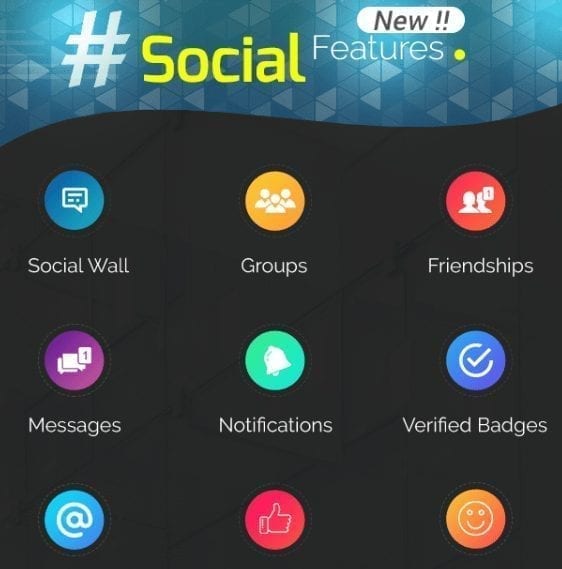
- Points and badges to reward members.
- Social login through Facebook, Twitter and more.
- Bookmarked posts.
- Likes, comments, replies and mentions, with emoji and reactions.
- A media uploader for photos and video.
- Site directories.
- Live URL previews, sticky posts and site-wide notices.
- A social wall for posts, pictures, video and other content.
- Friend connections: send, accept and remove.
- A follow and unfollow system.
- Notifications for likes, comments and mentions.
- Private messages.
- User groups.
- Ratings and reviews.
3. Membership features
 Youzify covers the sign-up path as well as the profile, which is the part most BuddyPress sites end up hand-building:
- Social login. Register and sign in with Facebook, Instagram, Google or LinkedIn.
- Login and registration forms. Several front-end form styles, with unlimited registration fields.
- Password reset, captcha, login-attempt limits and privacy controls.
- Manage signups. Work through pending BuddyPress signups from one screen.
- Front-end settings and data export. Members manage their own accounts without seeing wp-admin.
- Hide the dashboard and toolbar for logged-in members.
- Ajax login so signing in does not reload the page.
4. Directory features
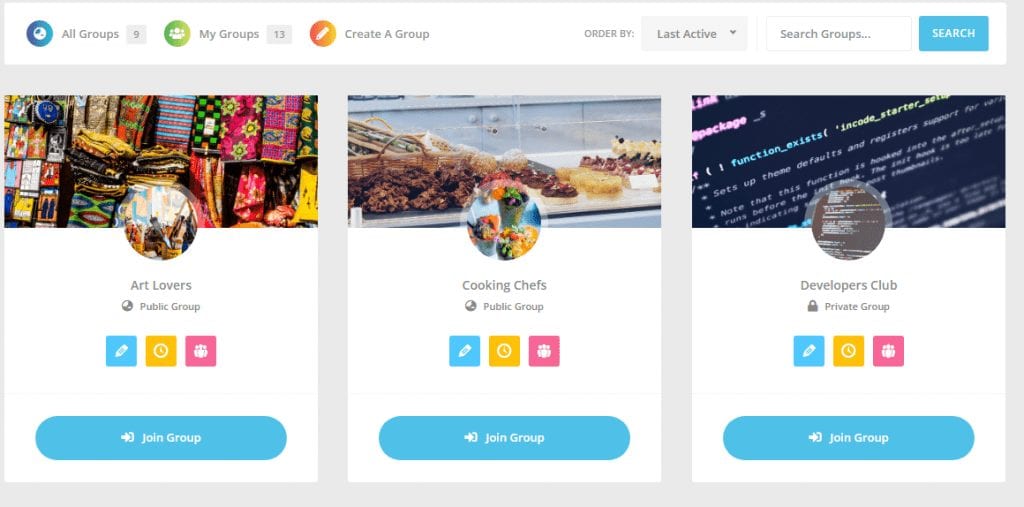 The directory templates cover a members’ directory, a group directory and a site-wide news feed. On a community with more than a few hundred members, a searchable directory is what stops the whole thing feeling empty.
Customisation options
 There are over 700 options in the admin panel, spread across 52 tabs. That is generous and it is also a warning: expect to spend an evening in the settings before the site looks the way you pictured it.
Layouts can be picked from the supplied templates and then adjusted, and premium add-ons extend things further with custom member types and sharing tools.
If you would rather get the social-network look from the theme instead of the plugin, our roundup of WordPress social network themes for BuddyPress is the place to start.
There are over 700 options in the admin panel, spread across 52 tabs. That is generous and it is also a warning: expect to spend an evening in the settings before the site looks the way you pictured it.
Layouts can be picked from the supplied templates and then adjusted, and premium add-ons extend things further with custom member types and sharing tools.
If you would rather get the social-network look from the theme instead of the plugin, our roundup of WordPress social network themes for BuddyPress is the place to start.
