WordPress Dark Themes: 7 Picks, Dark Mode or True Dark
Some links on this page are affiliate links. If you buy through one, WPNeon earns a commission at no extra cost to you. It does not change what we recommend — see how we review.
Blocksy is the WordPress dark theme to pick if you want a dark mode your visitors can switch on, because its Colour Mode Switch is a proper Pro extension with its own dark colour palette rather than a CSS filter laid over a light design, and it costs $69 a year or $199 once on top of a free theme. If instead you want a site that is dark for everyone, that is a different product entirely, and Newspaper at $59 or Soledad at $69 will serve you better. Working out which of those two things you actually want is the whole decision.
Do you want a dark design, or a dark mode?
The phrase “dark theme” covers two products that share almost nothing.
A genuinely dark design is built dark. Its demos, typography, image treatments and advert slots were all drawn against a black or near-black background, and the result looks intentional. Nobody sees a light version. This is what you want for a gaming site, a photography portfolio, a film or music site, or a magazine whose whole identity is moody.
A dark mode is a switch. The site ships light, and a toggle in the header, or the visitor’s operating system preference, swaps in a second colour palette. This is what you want for a blog, a documentation site or a business site where readers expect the choice and some of them read at night.
Buying the wrong one is the common mistake. A dark magazine theme will not give your readers a toggle, and a theme with a dark mode switch will not give you a designed dark aesthetic. Only the two themes in the first group below actually ship a switch.
| Theme | Price | Built on | Dark capability | Suits |
|---|---|---|---|---|
| Blocksy | Free; Pro $69/yr or $199 once | Block editor, Elementor | Colour Mode Switch with its own dark palette (Pro) | Blogs wanting a toggle |
| Astra | Free; Pro $69/yr or $249 once | Block editor, Elementor, Beaver Builder | Color Switcher widget, follows system setting (Pro) | Business sites wanting a toggle |
| Newspaper | $59 once | tagDiv Composer | Dark demos among 120+ pre-built sites | News and magazine sites |
| Jannah | $69 once | Built-in drag and drop builder | Pre-skinned light and dark demos | Magazines with a community |
| Soledad | $69 once | WPBakery | Dark Layout listed as a core feature | Blogs and WooCommerce |
| Oshine | $69 once | TATSU builder | Dedicated dark portfolio and photography demos | Creative portfolios |
| Divi | $89/yr or $249 once | Divi Builder | No dark preset; you set the palette yourself | Agencies, custom dark builds |
Prices checked September 2026.
Themes with a dark mode switch
#1. Blocksy
Blocksy is free on WordPress.org, and Blocksy Pro is $69 a year or $199 as a one-off. Its Colour Mode Switch is a Pro extension, and the reason it is the best implementation here is the Dark Mode Colour Palette section it adds to the Customiser: you define the alternative colours yourself rather than accepting an inverted version of your light palette.
That distinction matters more than it sounds. Automatic inversion produces pure white text on pure black, which is the most fatiguing combination to read, and Blocksy’s own documentation warns that direct opposites do not always give the best contrast. Being able to pick a soft off-white on a dark grey is the difference between a dark mode people use and one they switch off.
The limitation is that the switch is Pro only. The free theme is excellent, but it will not give your readers a toggle. Our Blocksy review covers where the free tier stops.
#2. Astra

Astra is free with Astra Pro at $69 a year or $249 once. Its Color Switcher widget arrived in Astra Pro 4.10.0 and does the one thing Blocksy’s documentation is quieter about: it can apply the right mode automatically from the visitor’s own system settings, so someone whose phone is in dark mode lands on a dark site without touching anything.
You define a default light palette and an alternate dark palette in Astra’s global colour settings, and the widget goes in the header.
The limitation is the same as Blocksy’s. This is a Pro feature, so the free theme gives you a fast light site and nothing more. Astra is also the safer pick if your site already runs on Elementor or Beaver Builder, since Blocksy leans harder towards the block editor.
Themes with a genuinely dark design
#3. Newspaper

Newspaper from tagDiv is $59 and the biggest seller of the group by a long way: 157,316 sales, a 4.80 rating and an update on 22 July 2026. It ships more than 120 pre-built sites, including a Black demo, and its own tagDiv Composer front-end builder.
For a news or magazine site the practical advantage is the advert handling. Newspaper’s ad slots and article layouts were designed together, which is exactly what breaks when you force a dark palette onto a theme that never expected one.
The limitation is architectural. tagDiv Composer is a proprietary builder, so your layouts do not travel if you leave, and $59 buys six months of support rather than a subscription.
#4. Jannah

Jannah from TieLabs is $69 with 25,812 sales, a 4.79 rating and a 3 April 2026 update. Its demos come pre-skinned in light and dark variants, so choosing dark is an import decision rather than a design project, and it has a built-in drag and drop builder rather than a bundled third-party one.
It is the pick when your dark magazine also needs a community layer, since Jannah is built with BuddyPress in mind. A dark skin plus BuddyPress is also the standard recipe for clan and esports sites, and our WordPress gaming themes comparison shows which ones bundle that community layer outright.
The limitation is update pace. A 3 April 2026 update is the oldest on this page, and for a theme carrying its own page builder that is worth watching.
#5. Soledad
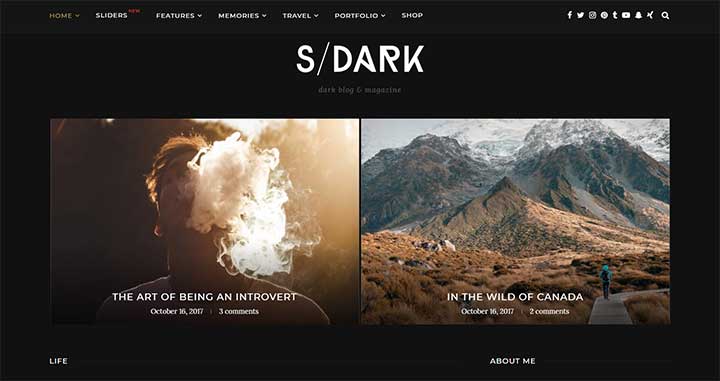
Soledad from PenciDesign is $69 with 60,419 sales, the highest rating on this page at 4.87, and a recent update on 21 August 2026. Dark Layout is listed as a core theme feature rather than one demo among many, and the theme ships an enormous homepage demo library alongside WooCommerce support.
It is the most versatile dark option here: the same licence covers a dark blog, a dark shop and a dark portfolio without buying anything else.
The limitation is WPBakery. Soledad’s layouts are built on an older page builder architecture than the block editor, which is fine while you stay on Soledad and awkward the day you leave.
#6. Oshine

Oshine from Brand Exponent is $69 with 38,192 sales, a 4.80 rating and a 15 July 2026 update. It is the portfolio specialist of the group, and unusually it ships demos that are dark by intent rather than by accident: a Dark Portfolio and Agency demo and a Dark Photography demo, each designed so images carry the page.
That is the right structure for creative work. A dark background makes photographs and film stills read better than any light theme manages, and Oshine’s gallery styles were drawn for exactly that.
The limitation is its TATSU page builder, which is proprietary to the theme and less widely known than Elementor or WPBakery, so there are fewer tutorials when you get stuck.
#7. Divi

Divi is $89 a year or $249 once, and both cover unlimited sites. It belongs here for one reason: if none of the pre-made dark designs above is quite right, Divi’s global colour settings and visual builder let you build the dark site you actually pictured, on as many domains as you like.
The honest framing is that Divi is not a dark theme. There is no dark preset to import and no visitor-facing toggle. You are buying a blank, capable builder and doing the design work yourself.
That suits an agency and frustrates anyone who wanted to import a demo and be finished by lunchtime.
Which should you pick?
For most people, Blocksy at $69 a year. Most searches for a dark WordPress theme are really searches for a dark mode toggle, and Blocksy’s separate dark palette gives you readable dark type instead of white-on-black glare. Astra is the equal choice if you are already on Elementor.
For a site that must be dark for everyone, Soledad at $69. Dark Layout is a core feature rather than one demo, the 4.87 rating is the highest here, and the August 2026 update is the most recent of the dark-by-design group.
The one to skip is Divi, for this purpose. At $89 a year it is the most expensive option on the page and the only one that gives you nothing dark out of the box. It is an excellent theme bought for the wrong reason if dark is your requirement.
One name to strike off your shortlist: Zox News. Both MVPThemes listings, Zox News and ZoxPress, now return “gone” from ThemeForest and the developer’s own product page is a 404, so there is nowhere left to buy it or get support. If you are running it already, plan a move. For a dark theme aimed at a club or venue rather than a magazine, our nightclub theme picks cover that niche properly.
Frequently asked questions
What is the difference between a dark theme and dark mode in WordPress?
A dark theme is designed dark for every visitor, with demos, typography and advert slots all drawn against a dark background. Dark mode is a switch that swaps a light site to a second dark colour palette, either when the visitor clicks a toggle or when their operating system is set to dark. Most themes offer one or the other, not both.
Which WordPress themes have a real dark mode toggle?
On this list, only Blocksy and Astra. Blocksy Pro adds a Colour Mode Switch with its own dark colour palette in the Customiser, and Astra Pro adds a Color Switcher widget that can also follow the visitor’s system setting automatically. Both require the paid add-on, so the free versions of either theme will not give your readers a toggle.
Is a dark website bad for readability?
Only if the contrast is wrong. Pure white text on pure black is the most fatiguing combination, which is why automatic colour inversion tends to produce an uncomfortable result. A soft off-white on a dark grey reads far better, and it is the reason a theme that lets you define a separate dark palette beats one that simply flips your existing colours.
How much do WordPress dark themes cost?
Between nothing and $89. Blocksy and Astra are free with paid tiers at $69 a year. Newspaper is $59, and Jannah, Soledad and Oshine are each $69 as one-off ThemeForest purchases that include lifetime updates and six months of support. Divi is $89 a year or $249 once.
Which dark WordPress theme is best for a photography portfolio?
Oshine at $69, because it ships demos built dark by intent, including a Dark Portfolio and Agency layout and a Dark Photography layout. A dark background makes photographs read better than any light theme manages, and Oshine’s gallery styles were designed around that rather than adapted to it.

@
All these themes are really awesome. I like the NewsMag theme. The look and style attracts me most. I will try this one and will share my experience with you. Have a good day!
@
Awesome!!! This is a well-organized list… Beneficial!!!
If anyone wants not to change their theme, still want a dark mode solution?
Well, in case of that, you can simply use a plugin like WP Dark Mode. It’ll give a cool dark look on your WP website. I personally love it for its coolest features. It supports dark mode on both the frontend as well as backend.