Beaver Themer Review: Price, Features and Verdict
Some links on this page are affiliate links. If you buy through one, WPNeon earns a commission at no extra cost to you. It does not change what we recommend – see how we review.
The short version
Beaver Themer is the theme-builder add-on that lets Beaver Builder edit headers, footers, archives, single-post layouts, 404 pages and WooCommerce templates with the same drag-and-drop editor. The important change: it is no longer a separate purchase – as of 4 September 2026 every paid Beaver Builder plan includes it at no extra cost, starting at $89 a year for one site. It suits agencies and anyone rebuilding a site’s template layer without PHP. One thing to avoid: buying the Starter plan if you manage more than a couple of sites – at $89 for one site it costs about 15 times more per site than the $299 Professional plan.
Prices read from wpbeaverbuilder.com and elementor.com, install counts from WordPress.org, on 4 September 2026.
What is Beaver Themer?
Beaver Themer is an add-on for Beaver Builder, the WordPress page builder. Beaver Builder on its own edits the content area of a page. Themer extends that editor to the parts of a site the theme normally controls: the header, the footer, the blog archive, the single-post template, search results, the 404 page and WooCommerce product and shop pages. Instead of editing PHP template files or living inside whatever options panel your theme ships, you build those layouts visually and set rules for where each one applies.
That is the whole proposition. It is not a theme, and it does not replace one – you still need a theme underneath, and Beaver Builder’s own Beaver Builder Theme or a lightweight option such as Astra is the usual choice. It also does nothing on the free version of Beaver Builder: Themer requires a paid plan.
What it costs, and the free tier
Beaver Builder restructured its packaging, and older reviews of this add-on (including an earlier version of this page) are out of date on the central fact. Themer used to be a separate licence bought on top of Beaver Builder Pro. Today the vendor’s own Themer page states it “is included with every Beaver Builder plan at no extra cost” and that “it used to be a separate purchase, but today every plan comes with the full theme builder”. The entry price for theme-building capability has therefore fallen substantially.
| Plan | Price per year | Sites | Theme builder included | Cost per site per year |
|---|---|---|---|---|
| Beaver Builder Lite (WordPress.org) | Free | Unlimited | No | $0 |
| Beaver Builder Starter | $89 | 1 | Yes (Themer) | $89.00 |
| Beaver Builder Plus | $179 | 3 | Yes (Themer) | $59.67 |
| Beaver Builder Professional | $299 | 50 | Yes (Themer) | $5.98 |
| Beaver Builder Unlimited | $546 | Unlimited | Yes (Themer) | Not calculable |
| Elementor Pro Essential (comparison) | $49 | 1 | Yes (Theme Builder) | $49.00 |
Read 4 September 2026 from wpbeaverbuilder.com/pricing, wpbeaverbuilder.com/beaver-themer and elementor.com/pricing. All four Beaver Builder plans are billed annually on automatic renewal and all four list Themer as included. Elementor’s pricing page rendered a figure only for its Essential tier when we read it; the Advanced Solo, Advanced and Expert prices did not display, so we do not quote them. Beaver Builder Lite is the free plugin on WordPress.org and does not run Themer. Divi, the other common comparison, was priced at $89 a year or $249 lifetime for unlimited sites when we read elegantthemes.com on 2 September 2026.
The figure nobody publishes: $89 versus $5.98 per site
Divide each plan’s price by the number of sites it covers and the tiering looks very different from the headline prices. Starter is $89.00 per site per year. Professional is $5.98 per site per year. The Starter plan therefore costs about 15 times more per site than Professional (89.00 / 5.98 = 14.9), even though Professional’s sticker price is more than three times higher.
Derivation: plan price divided by the plan’s site allowance, using the four prices and four site limits read from wpbeaverbuilder.com/pricing on 4 September 2026. Unlimited has no denominator, so it is left blank. The practical consequence is a sharp break-even: Professional pays for itself at four sites ($299 against 4 x $89 = $356 in Starter licences, or two Plus licences at $358), and every site after that is close to free. If you build client sites for a living, the cheap-looking tier is the expensive one.
What Themer actually builds
Three mechanisms do all the work, and it is worth knowing which is which before you buy.
Theme layouts
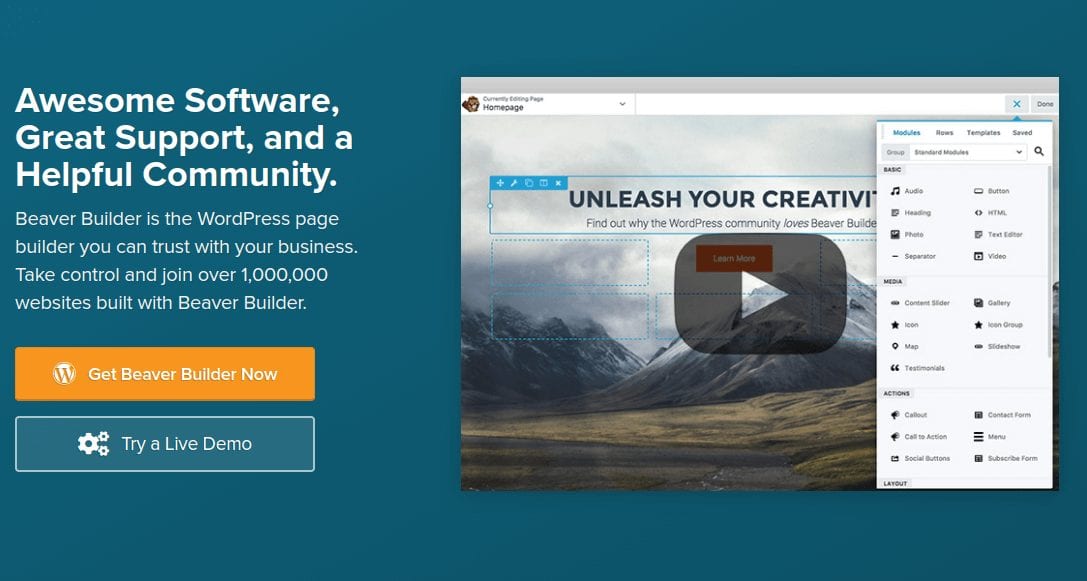
A theme layout is a template you design once and apply by rule. You build a single-post layout, then tell Themer where it applies – all posts, one category, one custom post type. The same applies to archives, search results, 404 pages and WooCommerce product and shop pages. Because the rules are separate from the design, one layout can serve a whole section of the site and you change it in one place. Divi’s Theme Builder covers the same conceptual ground; if you are weighing the two, note that third-party modules inside those templates are the main migration risk on Divi, and our guide to whether to move a live site to Divi 5 explains how to check first.
Theme parts
Theme parts are the smaller repeated pieces: headers, footers, and blocks you want injected above or below content across a set of pages – a subscription box, a signup form, a notice bar. They also work by display rule, and they can be positioned relative to existing content rather than only inside a template you have rebuilt. This is the feature most people actually buy Themer for, because building a custom header without touching a theme’s PHP is otherwise awkward.
Field connections
Field connections are what make a template a template rather than a fixed design. A connection binds a module’s setting to live data – the post title, the featured image, an author field, a custom field from ACF or a WooCommerce product attribute. Without connections you would be designing one page; with them you are designing a pattern that fills itself in from each post’s own data. If you have never worked with custom fields, this is the part of Themer with the steepest learning curve.
Where it loses
- No free path. Beaver Builder Lite is free and has 100,000+ active installs, but Themer does not run on it. The cheapest way to get a theme builder in this family is $89 a year; Elementor’s is $49 a year on its Essential tier. If budget is the deciding factor, Beaver is not the cheap option.
- It is a subscription, not a licence. All four plans are billed annually on automatic renewal. Stop paying and you keep the site but lose updates and support – a real risk for a template layer that has to survive WordPress and WooCommerce releases.
- Much smaller ecosystem. Beaver Builder Lite reports 100,000+ active installs against Elementor’s 10+ million. That gap decides how many tutorials, add-on modules and Stack Overflow answers exist when you get stuck, and how likely a plugin developer has tested against your builder.
- Lock-in at the template layer. Layouts and theme parts are stored in Beaver’s format. Leaving Themer means rebuilding your header, footer and archive templates from scratch, not re-skinning them – a harder migration than swapping a theme.
- Field connections assume knowledge you may not have. The interface is drag and drop, but deciding which field to connect where is a data-modelling job. Beginners can build a header on day one and will still be confused by dynamic archive layouts in week two.
- We have not benchmarked it. Everything above is read from vendor pages and WordPress.org plus hands-on familiarity with the editor. We have not run load tests comparing a Themer build against an Elementor or Divi build, so treat performance claims from any direction with suspicion.
Beaver Themer against Elementor Pro and Divi
All three now bundle a theme builder into the main product, so the choice is about ecosystem, licensing shape and how you work.
Elementor Pro is cheaper to start ($49 a year, one site) and enormously more popular – the free Elementor plugin reports 10+ million active installs and a 4.5 rating from 7,297 reviews on WordPress.org (v4.2.4, updated three days before we checked). Its Theme Builder is included on every Pro tier. Pick it if you want the largest add-on market and the shortest path to a tutorial for whatever you are trying to do.
Divi sells differently again: $89 a year or $249 for a lifetime licence covering unlimited sites, as read on 2 September 2026, with its Theme Builder included. For anyone running many sites, the lifetime option is the cheapest theme builder in this comparison over a long enough horizon. We set the two out side by side in the Beaver Builder vs Divi cost breakdown.
Beaver Builder with Themer earns its place on discipline rather than price. The editor produces markedly cleaner output than most builders, its shortcode footprint on deactivation is smaller, and the Professional tier’s $5.98 per site is the best per-site figure here for agencies at scale. Beaver Builder Lite is at version 2.10.3.2 with a 4.7 rating from 394 reviews, updated three weeks before we checked – a small but well-maintained project. If you have already standardised on Beaver Builder, Themer is now free with your plan and there is no decision left to make. For a broader look at the category, see our OptimizePress review and our guide to building a one-page WordPress site.
Our verdict, and how to buy it
Affiliate disclosure: the button below is an affiliate link. WPNeon earns a commission if you buy; you pay the same price.
Buy a Beaver Builder plan and Themer comes with it. Choose Professional ($299 a year, 50 sites) if you build sites for other people – it breaks even at four sites and costs $5.98 per site after that. Choose Starter ($89 a year, one site) only if you genuinely have one site and want Beaver’s clean output specifically. If price is the deciding factor and you have one site, Elementor Pro at $49 a year does the same job.
See Beaver Builder plans (affiliate)
Current plan details and any promotional pricing are on the vendor’s own pricing page. Prices on this page were read on 4 September 2026 and vendors change them without notice.
Frequently asked questions
What is Beaver Themer?
Beaver Themer is an add-on for the Beaver Builder page builder that extends its drag-and-drop editor to a site’s template layer: headers, footers, blog archives, single-post layouts, search results, 404 pages and WooCommerce templates. You design a layout once and apply it by rule, and field connections fill it with each post’s own data. It is not a theme and does not replace one.
How much does Beaver Themer cost?
Nothing on its own. As read on 4 September 2026, Beaver Themer is included at no extra cost in all four paid Beaver Builder plans: Starter at $89 a year for one site, Plus at $179 for three sites, Professional at $299 for 50 sites and Unlimited at $546 for unlimited sites. It used to be a separate purchase, which is why older reviews quote a higher total.
Is there a free version of Beaver Themer?
No. Beaver Builder Lite is free on WordPress.org, with 100,000+ active installs and a 4.7 rating from 394 reviews, but the vendor states that Themer requires a paid Beaver Builder plan and does not run on Lite. The cheapest route to Themer is the $89-a-year Starter plan.
Does Beaver Themer work with any WordPress theme?
In principle yes, because Themer takes over the template layer rather than modifying your theme’s files, and any theme that works with Beaver Builder will work with Themer. In practice a lightweight theme that gets out of the way, such as the Beaver Builder Theme or Astra, causes fewer conflicts than a heavy multipurpose theme with its own header and footer builders competing for the same output.
Which Beaver Builder plan is best value?
Professional, if you have four or more sites. At $299 a year for 50 sites it works out at $5.98 per site per year, against $89.00 for the one-site Starter plan and $59.67 for the three-site Plus plan, using prices read on 4 September 2026. Professional costs less than four Starter licences and less than two Plus licences, so it breaks even at four sites.
