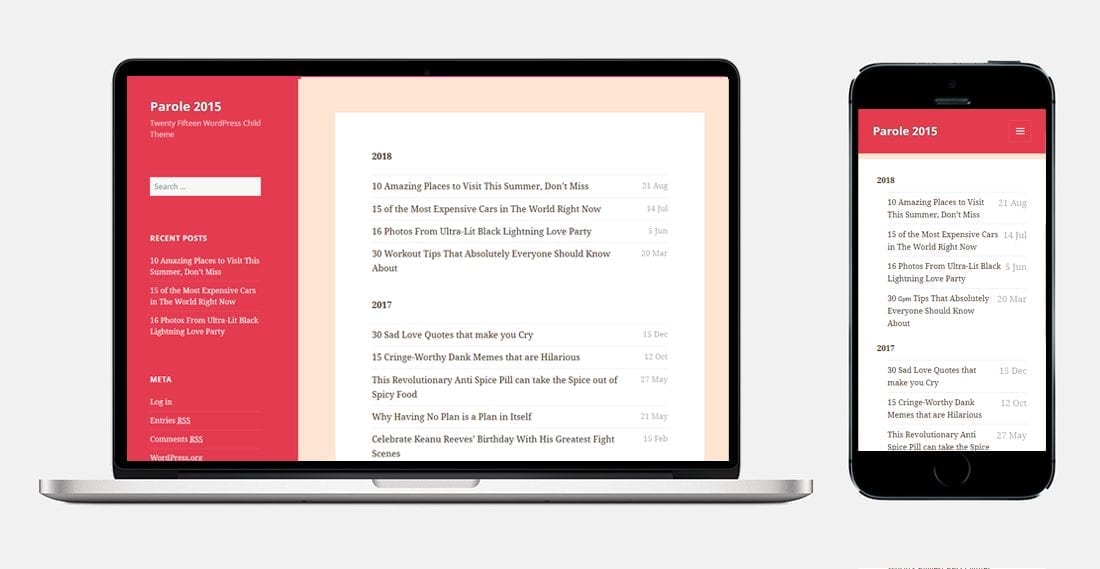
Parole 2015 is a free child theme of Twenty Fifteen, the WordPress default theme from that year. We built it for people who wanted Twenty Fifteen’s typography and reading experience with far more control over colour, and released it free on WordPress.org.
If you found this page through a footer credit on a site running Parole 2015, this covers what the theme is, what its child-theme architecture means for you in practical terms, and how to think about staying or moving.
View the Parole 2015 listing on WordPress.org
What Parole 2015 does
Twenty Fifteen was, and remains, one of the better-judged WordPress default themes for straightforward blogging. Its typography is unusually careful — generous line height, a sensible measure, strong hierarchy — and it reads well on a phone without anything added. Parole 2015 inherits all of that.
What we added was colour control. Parole supports extensive colour customisation across page elements: link colour, link hover, menu colour, background, header and sidebar. Twenty Fifteen ships with a fixed set of colour schemes; Parole was built for people who wanted to choose their own without editing CSS.
Beyond that it behaves as Twenty Fifteen behaves. It is responsive across laptop, tablet and phone viewports. It is a classic theme rather than a block theme, meaning it uses the Customizer for site-wide settings rather than the newer full site editing interface.
What being a child theme actually means for you
This is the part that matters most, and it is genuinely good news compared with most old free themes.

A child theme inherits templates, functions and styling from a parent, overriding only what it explicitly changes. Parole 2015 is a thin layer over Twenty Fifteen. The bulk of the code your site runs every day is not our code — it is WordPress core’s code.
And Twenty Fifteen is still maintained. Default themes are maintained by the WordPress project itself, and the project keeps them compatible with new core releases and new PHP versions long after third-party themes from the same era have been abandoned. When a WordPress release would otherwise break something, the default themes get fixed as part of that release.
So your practical position is: the substantial majority of your theme code is actively maintained by the WordPress project, and only the thin customisation layer on top is not. That is a considerably better place to be than running a standalone unmaintained theme — a situation we cover in detail on the Delish theme page.
Where the risk actually sits
Being a child of a maintained parent removes most of the usual risk, but not all of it.
The child layer is still unmaintained code
The colour customisation logic and any template overrides in Parole are ours, and they are not receiving updates. If a future WordPress release changes something those overrides depend on, the parent will be fixed and the child will not. In practice this is a small surface — a child theme of this kind is typically a stylesheet, a functions file and some Customizer additions — but it is not zero.
Classic themes sit outside the modern editing system
WordPress has moved toward block themes and full site editing. Twenty Fifteen and its children are classic themes. Nothing breaks, but you do not get block-based template editing, global styles, or the newer design tooling, and the gap widens with each release.
If you want that newer editing experience, no amount of patching a classic theme gets you there — you need a block theme. Our guide to Gutenberg-compatible themes covers the current options.
PHP version drift
Hosts move to newer PHP releases on their own schedule. Twenty Fifteen gets updated for those changes; Parole’s additions do not. If your host has recently moved you to PHP 8.x and you are seeing deprecation notices, check whether they originate in the parent or the child — your error log will name the files involved.
How to check where your site stands
Ten minutes, in this order:
- Appearance → Themes. Confirm Parole 2015 is active and Twenty Fifteen is installed as its parent. A child theme without its parent will not work.
- Tools → Site Health → Info. Your WordPress version, PHP version and server details in one screen. The Status tab flags what WordPress itself considers a problem.
- Check Twenty Fifteen is up to date. Because it is the parent, its updates matter more than anything else here. Do not delete it and do not skip its updates.
- Read your error log. Most hosts expose it in the control panel. Warnings pointing at files inside the Parole directory mean the child layer needs attention; warnings pointing at Twenty Fifteen usually mean an update is pending.
- Open the site on an actual phone, not a browser emulator, and click through a few posts.
If those come back clean you are in a reasonable position and can plan any change at your own pace.
Should you move to something else?
Honestly: not urgently, and not for the reasons people usually give.
The case for staying is real. The theme works, its parent is maintained by the WordPress project, Twenty Fifteen’s typography is still genuinely good, and a classic theme on a simple blog is a defensible setup in 2026. Changing themes costs time and risks breaking things that currently work. “It is old” is not by itself a reason.
The case for moving comes down to three situations:
- You want block editing and full site editing. The strongest reason. A classic theme cannot give you that, and the platform is clearly heading that way.
- You are seeing actual errors traceable to the child theme layer, which nobody is going to fix.
- The site has become commercially important. Once revenue depends on it, running unmaintained code becomes a business decision rather than a technical preference.
If none of those apply, staying is a legitimate answer.
If you do migrate
For a clean blog theme like this the natural successors are Twenty Twenty-Five (the current WordPress default — the same maintained-by-the-project advantage you have now, but block-native), Kadence, Blocksy or GeneratePress. All ship usable free versions. We compare the current field in our free WordPress themes roundup.
- Full backup first — files and database, stored off the server. See our backup plugin comparison if that is not already running.
- Build on staging, never the live site. If your host does not offer staging, that is a fair prompt to look at better WordPress hosting.
- Screenshot your Customizer settings before switching. Colour choices live in theme mods and are theme-specific — they will not carry across, and Parole’s colour options in particular have no direct equivalent elsewhere.
- Note your widget layout. Widget areas are defined by the theme; on switching, widgets move to an Inactive Widgets holding area. Nothing is lost, but everything needs reassigning.
- Re-map your menus to the new theme’s menu locations.
- Keep your permalinks identical. This is what protects your search rankings — a theme change does not affect URLs unless you change them, so do not.
- Confirm your SEO settings survived. Titles, descriptions and schema are handled by your SEO plugin rather than your theme, so they should be unaffected — but verify. Our WordPress SEO plugin guide and RankMath Pro review cover the main options.
Common questions
Can I delete Twenty Fifteen to save space?
No. Parole 2015 is a child theme and cannot function without its parent installed. Deleting Twenty Fifteen will break your site.
Is Parole 2015 still available to download?
It has a listing on WordPress.org. Availability of older themes can change without notice, so check the current listing rather than relying on this page. Do not install it from third-party mirror sites — repackaged themes from unofficial sources are a well-documented malware vector.
Will switching themes hurt my rankings?
Not on its own. Your URLs, content and metadata are unaffected by a theme change. Losses come from what changes alongside it: internal links that lived in widgets disappearing, heading structure changing, mobile layout regressing, or page speed dropping. Preserve those and you preserve your rankings.
Do I need to keep the footer credit?
No, there is no obligation to keep it.
The short version
Parole 2015 is a child theme of a WordPress default that the project still maintains, which puts you in a considerably better position than most people running a decade-old free theme. Keep Twenty Fifteen installed and updated, check your PHP version, and move to a block theme when you actually want block editing — not merely because the current one is old.
Our other free themes are documented at Dansal, a Twenty Sixteen child theme in the same position as this one, and Delish, which is a standalone theme and therefore a different case.