Kindergarten WordPress Themes: 4 Options for Daycare Sites
A preschool website has a more important job than looking colourful. Parents need to find programs, opening hours, fees, staff, enrolment details and a way to arrange a visit without hunting through decorative pages. The right kindergarten WordPress theme makes those tasks easy on a phone.
Match a theme to your school
Want a ready-made daycare page set? Explore Divi’s daycare layout pack. Prefer a free starting theme? Consider Astra. Need school-specific schedules and staff layouts? Compare Fable and the specialist Playroom theme.
Kindergarten themes compared
| Theme | Relevant feature | Check first |
|---|---|---|
| Divi | A dedicated daycare page pack | Whether you want to work in its visual builder |
| Astra | Flexible starter templates and free base theme | Which school template and builder are included |
| Fable | Kindergarten-focused pages and timetable-related features | Current bundled plugins and editing workflow |
| Playroom | Childcare-oriented demos | Elementor dependencies and admission-form setup |
1. Divi — a ready-made daycare page pack
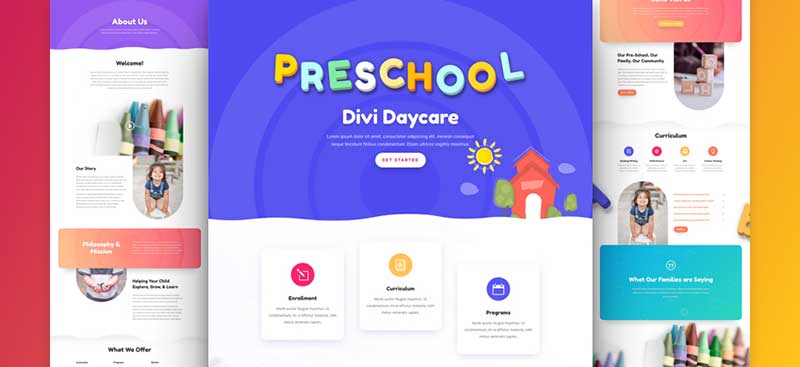
Elegant Themes’ daycare layout pack includes home, programs, about, pricing, contact, blog and landing-page layouts. These are a useful starting structure for explaining what a school offers. Divi is the broader theme and visual builder; you will still need to configure actual enquiry or application forms and any parent portal yourself.
See Divi daycare demos & plans →
2. Astra — a flexible, free starting point

Astra is a multipurpose theme with a free version and starter templates. The publisher’s WordPress.org listing shows a September 2026 update. Choose a child-friendly design without sacrificing readable type and clear navigation. Verify the exact starter template, page builder and any Pro-only elements before importing a demo.
Browse Astra starter templates →
3. Fable — a specialist school design

The Fable publisher listing describes child-care pages, teachers, classes and timetable functionality, and records a July 2026 update. A specialist theme can reduce the work of creating a school-specific layout, but test whether its timetable is sufficient for your actual activities and whether staff can edit it easily.
4. Playroom — another dedicated kindergarten layout
ThemeForest’s kindergarten category lists Playroom with childcare-focused designs and Elementor compatibility. Compare its demo pages and editing requirements against Fable, especially if your team already uses Elementor. Use the seller’s listing to confirm today’s available package and support terms.
Browse current kindergarten themes →
What a preschool website really needs
- Parents’ first questions: put age groups, daily schedule, fees and availability within one or two taps.
- Trust and accessibility: introduce staff, explain safeguarding practices and use readable type with strong colour contrast.
- Enrolment: connect forms to a real inbox or admissions system; confirm the acknowledgement arrives.
- Privacy: use only photos and children’s information for which you have the appropriate permissions.
- Maintenance: verify that the school can update holidays, programs and notices without a developer.
If you need a broader education platform rather than a preschool brochure, explore our education theme comparison.
